VMware 2v0-21-23 practice test
VMware vSphere 8.x Professional
Question 1
An administrator is tasked with applying updates to a vSphere cluster running vSAN using vSphere
Lifecycle Manager. Downtime to the ESXI hosts must be minimal while the work Is completed.
The administrator has already completed the following steps and no errors have been returned:
• Downloaded all applicable software and created a new Image
• Attached the new Image to the cluster and run a compliance check against the Image for the
cluster
• Ran a remediation pre-check for the cluster
Which two series of steps should the administrator perform to start the remediation of the cluster
using the new image? (Choose two.)
A.
1. Use the Remediate option in vSphere Lifecycle Manager to remediate all of the ESXI hosts in the
cluster in parallel.
2. Allow vSphere Lifecycle Manager to automatically control maintenance mode on the ESXI hosts.
B.
1. Place each of the ESXI hosts into maintenance mode manually.
2. Use the Stage option in vSphere Lifecycle Manager to stage the required software on all ESXi hosts
one at a time.
C.
1. Leave all ESXI hosts in the cluster operational.
2. Use the Stage All option in vSphere Lifecycle Manager to stage the required software onto all ESXI
hosts one at a time.
C.
l Leave all ESXI hosts in the cluster operational
2. Use the Stage All option in vSphere Lifecycle Manager to stage the required software onto all ESXI
hosts in the cluster In parallel.
D.
1 Use the Remediate Option In vSphere Lifecycle Manager to remediate all of the ESXI hosts In the
cluster In sequence.
2. Allow vSphere Lifecycle Manager to automatically control maintenance mode on the ESXI hoy
Answer:
AD
Explanation:
Option A and D are correct because they allow vSphere Lifecycle Manager to automatically control
maintenance mode on the ESXi hosts and remediate them in parallel or in sequence. Option B and C
are incorrect because they require manual intervention to place the hosts into maintenance mode or
to stage the software on each host, which is not efficient or minimal downtime. Reference:
https://docs.vmware.com/en/VMware-vSphere/7.0/com.vmware.vsphere-lifecycle-manager.doc/GUID-9F9E3F8C-0E2B-4B6A-8C5C-3F8E5F6B4E9D.html
Question 2
An administrator is working with VMware Support and Is asked to provide log bundles for the ESXI
hosts in an environment. Which three options Joes the administrator have? (Choose three.)
- A. Generate a combined log bundle for all ESXI hosts using the vCenter Management Interface.
- B. Generate a separate log bundle for each ESXI host using the vSphere Host Client.
- C. Generate a combined log bundle for all ESXI hosts using the vSphere Client.
- D. Generate a separate log bundle for each ESXI host using the vSphere Client.
- E. Generate a separate log bundle for each ESXI host using the vCenter Management Interface.
- F. Generate a combined log bundle for all ESXi hosts using the vSphere Host Client.
Answer:
BCD
Explanation:
Option B, C and D are correct because they are valid methods to generate log bundles for individual
or multiple ESXi hosts using different interfaces. Option A and E are incorrect because they are not
possible options to generate log bundles for all ESXi hosts using the vCenter Management Interface.
Option F is incorrect because it is not possible to generate a combined log bundle for all ESXi hosts
using the vSphere Host Client. Reference:
https://docs.vmware.com/en/VMware-vSphere/7.0/com.vmware.vsphere.troubleshooting.doc/GUID-9A94C3D1-38A4-4A5F-AFE7-8CDBE8D6D988.html
Question 3
An administrator needs to consolidate a number of physical servers by migrating the workloads to a
software-defined data center solution.
Which VMware solution should the administrator recommend?
- A. VMware Horizon
- B. VMware vSAN
- C. VMware vSphere
- D. VMware
Answer:
C
Explanation:
Option C is correct because VMware vSphere is the solution that provides a software-defined data
center platform that can consolidate physical servers by migrating the workloads to virtual machines.
Option A is incorrect because VMware Horizon is a solution for virtual desktop infrastructure (VDI)
and application delivery. Option B is incorrect because VMware vSAN is a solution for software-
defined storage that is integrated with vSphere. Option D is incorrect because VMware NSX is a
solution for software-defined networking that is integrated with vSphere. Reference:
https://www.vmware.com/products/vsphere.html
Question 4
An administrator is tasked with configuring remote direct memory access (RDMA) over Converged
Ethernet v2 (RoCE v2).
Which two types of adapters must the administrator configure? (Choose two.)
- A. Paravirtual RDMA adapter
- B. RDMA network adapter
- C. Software iSCSi adapter
- D. Fibre Channel over Ethernet (FCoE) adapter
- E. Software NVMe over RDMA storage adapter
Answer:
BD
Explanation:
ESXi 7 and later supports RoCE v2 technology, which enables RDMA over an Ethernet network. Hosts
use an RDMA network adapter installed on the host and a software NVMe over RDMA storage
adapter.
https://docs.vmware.com/en/VMware-vSphere/8.0/vsphere-storage/GUID-F4B42510-9E6D-4446-816A-5012866E0038.html
Question 5
An administrator has a host profile named Standard-Config. The administrator wants to change the
other host profiles to use only the storage configuration settings that are defined in the Standard-
Config host profile.
What should the administrator do to make this change?
- A. Export host customizations and import them to the other host profiles.
- B. Copy the storage settings from Standard-Config to all other host profiles.
- C. Duplicate the Standard-Config host profile and only modify the storage configuration settings.
- D. Export the Standard-Config host profile and attach it to the other hosts.
Answer:
B
Explanation:
Option B is correct because it allows the administrator to copy the storage settings from Standard-
Config host profile to all other host profiles without affecting other settings. Option A is incorrect
because it only exports host customizations and not host profile settings. Option C is incorrect
because it creates a new host profile instead of modifying the existing ones. Option D is incorrect
because it attaches the Standard-Config host profile to the other hosts instead of changing their host
profiles. Reference:
https://docs.vmware.com/en/VMware-vSphere/7.0/com.vmware.vsphere.hostprofiles.doc/GUID-F1A1D1D0-D6A3-4F1B-B7A7-B2D2F7C6E9AF.html
Question 6
Refer to the exhibit.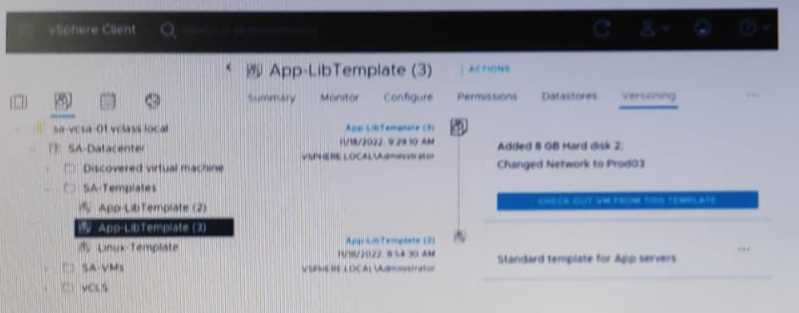
Given the configuration shown in the exhibit, what must the administrator do to delete only the
latest version of the template?
- A. Delete App-LibTemplete (3) from the SA-Templates folder.
- B. In the SA-template folder, rename App-Libtemplate (2) to App-LibTemplate
- C. Check out AppLibTemplate (3) and delete the template from the SA-Templates folder.
- D. Revert to APP-LibTemplate (2) and delete App-LibTemplate (3).
Answer:
D
Explanation:
Option D is correct because it allows the administrator to delete only the latest version of the
template by reverting to the previous version and then deleting the current version. Option A is
incorrect because it deletes the entire template and not just the latest version. Option B is incorrect
because it renames the previous version to the current version and does not delete anything. Option
C is incorrect because it checks out the latest version and deletes it from the folder, but not from the
library. Reference:
https://docs.vmware.com/en/VMware-vSphere/7.0/com.vmware.vsphere.vm_admin.doc/GUID-9F9E3F8C-0E2B-4B6A-8C5C-3F8E5F6B4E9D.html
Question 7
A vSphere cluster has the following configuration:
• Virtual machines (VMs) are running Production and Test workloads
• vSphere Distributed Resource Scheduler (DRS) is enabled
• There are no resource pools in the cluster
Performance monitoring data shows that the Production workload VMs are not receiving their fully
allocated memory when the vSphere cluster is fully utilized.
A combination of which two steps could the administrator perform to ensure that the Production
VMs are always guaranteed the full allocation of memory? (Choose two.)
- A. Assign a custom memory share value to the resource pool containing the Production VMs.
- B. Assign a memory reservation value to the resource pool containing the Production VMs.
- C. Create a parent resource pool for the Production VMs.
- D. Create a sibling resource pool for each of the Production and Test VMs.
- E. Create a child resource pool for the Test VMs.
Answer:
BD
Explanation:
https://docs.vmware.com/en/VMware-vSphere/8.0/vsphere-resource-management/GUID-60077B40-66FF-4625-934A-641703ED7601.html
Question 8
Which two datastore types store the components of a virtual machine as a set of objects? (Choose
two.)
- A. VMware Virtual Machine File System (VMFS)
- B. VMware vSAN
- C. Network File System (NFS) 3
- D. vSphere Virtual Volumes (vVols)
- E. Network File System (NFS) 4.1
Answer:
BD
Explanation:
Option B and D are correct because they are the datastore types that store the components of a
virtual machine as a set of objects, which are logical containers that abstract physical storage
resources. Option A, C and E are incorrect because they are the datastore types that store the
components of a virtual machine as a set of files, which are stored on a file system that resides on a
physical storage device. Reference:
https://docs.vmware.com/en/VMware-vSphere/7.0/com.vmware.vsphere.storage.doc/GUID-9F9E3F8C-0E2B-4B6A-8C5C-3F8E5F6B4E9D.html
Question 9
Refer to the exhibit.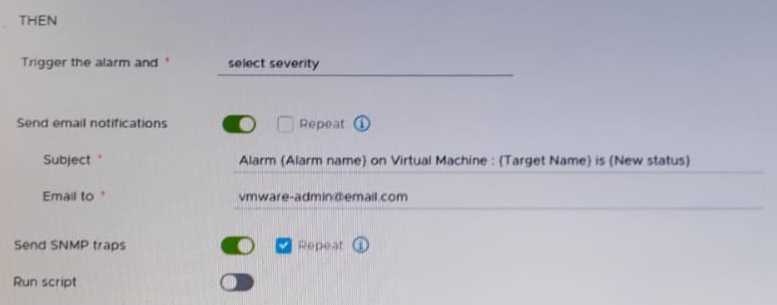
After updating a predefined alarm on VMware vCenter, an administrator enables email notifications
as shown in the attached alarm; however, notifications are NOT being sent.
Where must the mail server settings be configured by the administrator to resolve this issue?
- A. In the ESXi host system config
- B. In the alarm rule definitions
- C. In the vCenter settings in the vSphere Client
- D. in the vCenter Management Interface
Answer:
C
Explanation:
Option C is correct because it allows the administrator to configure the mail server settings in the
vCenter settings in the vSphere Client, which are required for sending email notifications for alarms.
Option A is incorrect because it configures the mail server settings on an ESXi host system, which are
not used for sending email notifications for alarms. Option B is incorrect because it configures the
alarm rule definitions, which are already enabled in the exhibit. Option D is incorrect because it
configures the vCenter Management Interface, which is not used for sending email notifications for
alarms. Reference:
https://docs.vmware.com/en/VMware-vSphere/7.0/com.vmware.vsphere.monitoring.doc/GUID-A2A4371A-B888-404C-B23F-C422A8C40F54.html
Question 10
An administrator creates a virtual machine that contains the latest company-approved software,
tools and security updates. Company policy requires that only full clones are allowed for server
workloads.
A combination of which two tasks should the administrator complete to prepare for the deployment
of this virtual machine for multiple users? (Choose two.)
- A. Set appropriate permissions on the virtual machine.
- B. Create a virtual machine customization specification.
- C. Upgrade the virtual hardware.
- D. Convert the virtual machine to a template.
- E. Take a snapshot of the virtual machine.
Answer:
BD
Explanation:
Option B and D are correct because they allow the administrator to create a virtual machine
customization specification, which can be used to customize guest operating system settings for
multiple virtual machines, and convert the virtual machine to a template, which can be used to
create full clones of server workloads. Option A is incorrect because assigning appropriate
permissions on the virtual machine does not prepare it for deployment for multiple users. Option C is
incorrect because upgrading the virtual hardware does not prepare it for deployment for multiple
users. Option E is incorrect because taking a snapshot of the virtual machine does not prepare it for
deployment for multiple users. Reference:
https://docs.vmware.com/en/VMware-vSphere/7.0/com.vmware.vsphere.vm_admin.doc/GUID-9F9E3F8C-0E2B-4B6A-8C5C-3F8E5F6B4E9D.html
Question 11
During the staging of a patch on a vCenter Server Appliance, an error was encountered and the
process stopped. An administrator resolved the root cause and is ready to continue with the staging
of the patch.
From the vCenter Management Interface, which action should the administrator take to continue the
process from the point at which the error occurred?
- A. Use the Stage and Install option to resume the staging.
- B. Use the Resume option to resume the staging.
- C. Use the Unstage option to restart the staging.
- D. Use the Stage Only option to restart the staging.
Answer:
B
Explanation:docs.vmware.com/en/VMware-vSphere/7.0/com.vmware.vcenter.upgrade.doc/GUID-FF533442-66F0-4797-976D-1DA99102DD0A.html
Question 12
An administrator is adding a new ESXi host to an existing vSphere cluster. When selecting the cluster,
the administrator Is unable to use the Cluster Quickstart workflow to add and configure the
additional host.
What could be the root cause of this issue?
- A. The administrator has previously dismissed the Cluster Quickstart workflow.
- B. The administrator must manually add the host to the cluster before using the Cluster Quickstart workflow.
- C. The administrator has not been assigned the required permissions to use the Cluster Quickstart workflow.
- D. The administrator must enable the Cluster Quickstart workflow option in VMware vCenter.
Answer:
A
Explanation:
Option A is correct because it indicates that the administrator has previously dismissed the Cluster
Quickstart workflow, which will prevent them from using it to add and configure an additional host.
To use the Cluster Quickstart workflow again, the administrator must enable it in the cluster settings.
Option B is incorrect because the administrator does not need to manually add the host to the
cluster before using the Cluster Quickstart workflow, as this is one of the steps in the workflow.
Option C is incorrect because the administrator does not need any special permissions to use the
Cluster Quickstart workflow, as long as they have permissions to perform cluster operations. Option
D is incorrect because there is no option to enable the Cluster Quickstart workflow in VMware
vCenter, as this is a feature of vSphere clusters. Reference:
https://docs.vmware.com/en/VMware-vSphere/7.0/com.vmware.vsphere.vcenterhost.doc/GUID-9F9E3F8C-0E2B-4B6A-8C5C-3F8E5F6B4E9D.html
Question 13
A company has two sites: Site A and Site B. The administrator would like to manage the VMware
vCenter inventories in both sites from a single vSphere Client session.
Which vCenter feature must be configured?
- A. VMware Certificate Authority
- B. VMware Site Recovery Manager
- C. vCenter Single Sign-On
- D. Enhanced Linked Mode
Answer:
D
Explanation:
Option D is correct because it indicates that Enhanced Linked Mode must be configured to allow the
administrator to manage the VMware vCenter inventories in both sites from a single vSphere Client
session. Enhanced Linked Mode allows multiple vCenter Server instances to share information such
as tags, licenses, roles, permissions, and policies. Option A is incorrect because VMware Certificate
Authority is a service that provides certificates for vSphere components and does not affect
inventory management. Option B is incorrect because VMware Site Recovery Manager is a solution
that provides disaster recovery and business continuity for vSphere environments and does not
affect inventory management. Option C is incorrect because vCenter Single Sign-On is a service that
provides authentication and authorization for vSphere components and does not affect inventory
management. Reference:
https://docs.vmware.com/en/VMware-vSphere/7.0/com.vmware.vcenter.install.doc/GUID-9F9E3F8C-0E2B-4B6A-8C5C-3F8E5F6B4E9D.html
Question 14
An administrator plans to update the Supervisor cluster and has noticed some of the Tanzu
Kubemetes Grid clusters are running an incompatible version.
Which action must the administrator take before proceeding with the Supervisor cluster update?
- A. Update all Tanzu Kubernetes Grid clusters to the latest version prior to the Supervisor cluster update.
- B. No action is needed - Tanzu Kubernetes Grid clusters will be updated automatically as part of the update process.
- C. No action is needed - Incompatible Tanzu Kubernetes Grid clusters can be manually updated after the Supervisor cluster update.
- D. Update incompatible Tanzu Kubernetes Grid clusters prior to the Supervisor cluster update.
Answer:
D
Explanation:
Option D is correct because it indicates that the administrator must update incompatible Tanzu
Kubernetes Grid clusters prior to the Supervisor cluster update, as this will ensure that there are no
compatibility issues or disruptions during or after the update process. Option A is incorrect because
it is not necessary to update all Tanzu Kubernetes Grid clusters to the latest version prior to the
Supervisor cluster update, as some clusters may already be compatible with the new version. Option
B is incorrect because Tanzu Kubernetes Grid clusters will not be updated automatically as part of the
update process, as they require manual intervention from the administrator. Option C is incorrect
because incompatible Tanzu Kubernetes Grid clusters cannot be manually updated after the
Supervisor cluster update, as they may become inaccessible or unstable due to compatibility issues.
Reference:
https://docs.vmware.com/en/VMware-vSphere/7.0/vmware-vsphere-with-tanzu/GUID-9F9E3F8C-0E2B-4B6A-8C5C-3F8E5F6B4E9D.html
https://docs.vmware.com/en/VMware-vSphere/8.0/vsphere-with-tanzu-maintenance/GUID-292482C2-A5FA-44B5-B26E-F887A91BB19D.htmlIfaTanzuKubernetesGridclusterisincompatible
with vSphere 8, upgrade the cluster before proceeding with the system upgrade.
Question 15
Which three vSphere features are still supported for Windows-based virtual machines when enabling
vSphere's -virtualization-based security feature? (Choose three.)
- A. vSphere vMotion
- B. PCI passthrough
- C. vSphere High Availability (HA) D, vSphere Fault Tolerance
- E. vSphere Distributed Resources Scheduler (DRS)
- F. Hot Add of CPU or memory
Answer:
ACE
Explanation:
Option A, C and E are correct because they indicate that vSphere features such as vMotion, High
Availability (HA) and Distributed Resource Scheduler (DRS) are still supported for Windows-based
virtual machines when enabling vSphere’s virtualization-based security feature, which provides
enhanced protection for guest operating systems and applications against various attacks. Option B is
incorrect because PCI passthrough is not supported for Windows-based virtual machines when
enabling vSphere’s virtualization-based security feature, as this feature requires direct access to
physical devices that cannot be shared or protected by hypervisor mechanisms. Option D is incorrect
because Fault Tolerance is not supported for Windows-based virtual machines when enabling
vSphere’s virtualization-based security feature, as this feature requires identical execution states for
primary and secondary virtual machines that cannot be guaranteed by hypervisor mechanisms.
Option F is incorrect because Hot Add of CPU or memory is not supported for Windows-based virtual
machines when enabling vSphere’s virtualization-based security feature, as this feature requires
dynamic changes to virtual hardware configuration that cannot be handled by hypervisor
mechanisms. Reference:
https://docs.vmware.com/en/VMware-vSphere/7.0/com.vmware.vsphere.security.doc/GUID-A2A4371A-B888-404C-B23F-C422A8C40F54.html