ServiceNow cis discovery practice test
Discovery
Question 1
Refer to the exhibit.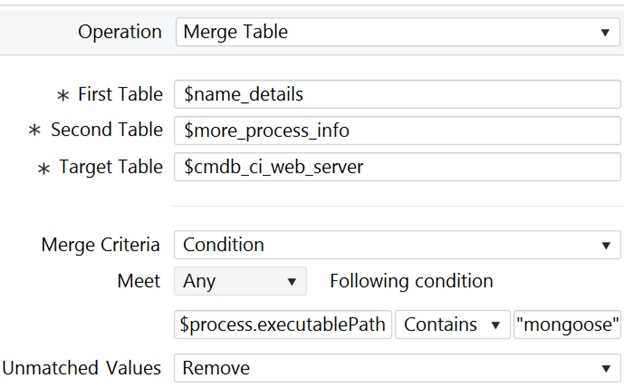
Based on this image, which of the following statements are true? (Choose three.)
- A. Attributes from two tables populate a table with the same name as a ServiceNow CMDB table.
- B. This operation is more than likely a part of a step on a pattern set to Application Pattern Type.
- C. If a value is unmatched, it is still merged into the Target Table.
- D. For this operation to run, there must be some data in the process.executablePath variable.
- E. This is a horizontal pattern of type "infrastructure."
Answer:
A, B, D
Explanation:
A is true because the target table $cmdb_ci_web_server is a ServiceNow CMDB table that stores
information about web servers1
.
B is true because the merge table operation is typically used for application patterns, which are
horizontal patterns that discover applications and their dependencies. The condition on the
process.executablePath variable suggests that the operation is looking for a specific application
(mongoose) running on the web servers.
D is true because the merge table operation requires at least one matching field value between the
two source tables1
. In this case, the process.executablePath variable is the matching field, and it
must contain “mongoose” for the operation to run.
Reference:
: Merge tables - Product Documentation: San Diego - Now Support Portal
: Product Documentation | ServiceNow
[4]: Discovery Patterns - Product Documentation: San Diego - Now Support Portal
Question 2
Refer to the exhibit.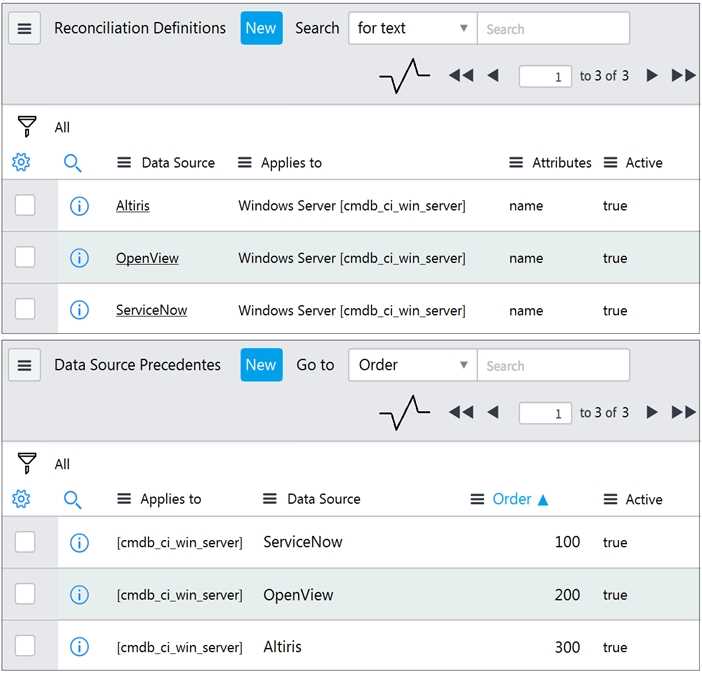
Based on the following images, which choice best describes what occurs if Discovery sets the name
attribute of a discovered Windows Server CI to 'Windows1' and then Altiris discovery runs detecting
'Windows2' for the name attribute on the same CI?
- A. The name of the CI stays 'Windows1'.
- B. The name of the CI changes to 'Windows2'.
- C. The name of the CI does not populate with either discovery.
- D. The CI is not discovered because Discovery is not listed in either image.
Answer:
B
Explanation:
In ServiceNow Discovery, the reconciliation process is governed by precedence rules. These rules
determine which data source’s information will be retained if there are conflicts when multiple
sources discover the same CI. In this case, Altiris has a higher order of precedence (300) compared to
ServiceNow (100), as seen in the “Data Source Precedents” section of the image. Therefore, if Altiris
discovers ‘Windows2’ for the name attribute on the same CI after ServiceNow sets it to ‘Windows1’,
the name will change to ‘Windows2’ due to Altiris’s higher precedence.
Reference: The explanation is inferred from understanding how reconciliation and data source
precedents work in ServiceNow Discovery, though not directly quoted from specific documents. You
can find more information on these topics in the following links:
Reconciliation
Data source precedents
Question 3
For the Parse Variable pattern operation, what is required to have two different parsing methods to
populate variables?
- A. Two different Debug Mode sessions.
- B. A tabular and a scalar variable.
- C. Two different steps.
- D. Two different Define Parsing selections on the same step.
Answer:
C
Explanation:
The Parse Variable pattern operation allows you to extract information from the output of a previous
operation and save it in a variable. You can choose from different parsing methods, such as JSON File,
XML File, Regular Expression, or Custom Script. To have two different parsing methods to populate
variables, you need to use two different steps, each with a different Define Parsing selection. For
example, you can use one step to parse a JSON file and another step to parse an XML file. You cannot
use two different parsing methods on the same step, as the Define Parsing selection is unique for
each step.
Reference:
Parse command output
: This article explains how to use the Parse command output operation and
the different parsing methods available.
Pattern Designer: Parse Variable - JSON File gives error
: This article provides a troubleshooting tip for
using the JSON File parsing method.
Examples of EVAL scripts used in Discovery patterns
: This article provides some examples of custom
scripts that can be used for the Custom Script parsing method.
Question 4
Which best describes Discovery schedule of type Configuration Item?
- A. Verifies Configuration Item data from the scanned IP ranges against the data in the CMDB.
- B. Creates only a list of discovered IPs in both IPv4 and IPv6 formats.
- C. Collects complete information from the scanned IP ranges and sends it to the CMDB.
- D. Directly populates records in the assets table.
Answer:
C
Explanation:
A Discovery schedule of type Configuration Item collects complete information from the scanned IP
ranges and sends it to the CMDB. This type of schedule runs a series of probes and sensors to identify
and classify the devices and applications on the network, and to create or update the corresponding
configuration items in the CMDB. A Discovery schedule of type Configuration Item can also run
patterns to discover more details and relationships about the configuration items.
Reference:
ServiceNow Discovery Overview
Create a Discovery schedule
Discovery schedule types
Question 5
When installing a MID Server on a Windows platform, which right must be associated when creating
a Service Account?
- A. Local Admin
- B. Domain Admin
- C. MID Server User Role
- D. Log on as service
Answer:
D
Explanation:
The Service Account for the MID Server must have the Log on as service right on the Windows
platform. This right allows the MID Server to run as a Windows service and communicate with the
ServiceNow instance. The Service Account does not need to have local or domain admin rights, as
these are not required for the MID Server functionality. The MID Server User Role is a role on the
ServiceNow instance, not on the Windows platform, and it is used to control the access and
permissions of the MID Server on the instance.
Reference:
Correcting MID Server Windows service account user and permissions
What is a ServiceNow MID Server and how does it work?
Configure Windows MID Server service credentials
Question 6
Which of the below choices are needed for Quick Discovery? (Choose two.)
- A. MID Server
- B. Discovery Schedule
- C. PID
- D. Target IP
Answer:
A, D
Explanation:
Quick Discovery is a wizard that helps you get up and running with Discovery quickly. It discovers
both physical and logical components, including virtual machines, servers, storage, databases,
applications, and more. To use Quick Discovery, you need to have a MID Server installed and
configured, and provide a target IP range or subnet to scan. You do not need to create a Discovery
Schedule or a PID for Quick Discovery.
Reference:
ServiceNow Discovery Data Sheet
,
Discovery Quick Start
Question 7
In order to use Debug from the Pattern Designer, you must have what?
- A. a proxy server
- B. a discoverable CI
- C. the admin role
- D. Service Mapping installed
Answer:
C
Explanation:
Debug mode is a feature of the Pattern Designer that allows you to test and troubleshoot your
patterns in real time. To activate Debug mode, you need to have the admin role or a role that
includes the pattern_designer_debug permission.
Debug mode is not available for users who only
have the pattern_designer_read permission1
.
Reference: 1
:
Activate pattern Debug mode - Product Documentation: San Diego - ServiceNow
Question 8
A discovery runs against a Windows Server returning the following attribute values for the first time:
name = WindowsSN1 serial_number = 12321
A subsequent discovery is ran against a different Windows Server returning the following attribute
values: name = WindowsSN2
serial_number = 12321
With only base system CI Identifiers configured, which of the following is true?
A. A Windows Server CI is created, then updated with WindowsSN2 as the name.
B. Two Windows Sewer CIs are created, with WindowsSN1 AND WindowsSN2 for names.
C. Two Windows Server CIs are created, without serial_number values.
D. A Windows Server CI is created, then updated with WindowsSN1 as the name.
Answer:
B
According to the ServiceNow Discovery documentation, the base system CI Identifiers for Windows
Server class are name and serial_number. These are the attributes that Discovery uses to uniquely
identify a Windows Server CI. If both attributes match an existing CI, Discovery updates that CI. If
only one attribute matches, Discovery creates a new CI. If neither attribute matches, Discovery also
creates a new CI. In this scenario, the serial_number is the same for both Windows Servers, but the
name is different. Therefore, Discovery will create two separate CIs, one with WindowsSN1 as the
name and one with WindowsSN2 as the name.
Reference:
Create a Discovery CI classification - Product Documentation: Tokyo - Now Support Portal
Identification rules - Product Documentation: Tokyo - Now Support Portal
ServiceNow IRE: Identification Rules Explained — Cookdown
Question 9
Which choice represents the three best ways of extending Discovery?
- A. Orchestration, Classifiers, Discovery Patterns
- B. Fingerprinting, Classifiers, Discovery Patterns
- C. Orchestration, Classifiers, Probes & Sensors
- D. Classifiers, Probes & Sensors, Discovery Patterns
- E. Classifiers, Fingerprinting, Probes & Sensors
Answer:
D
Explanation:
ServiceNow Discovery can be extended in three main ways: Classifiers, Probes & Sensors, and
Discovery Patterns. Classifiers are used to identify the type of device or application that is being
discovered, based on the information returned by a probe. Probes are commands or scripts that are
executed on the target device or application to collect data. Sensors are scripts that process the data
collected by probes and create or update configuration items (CIs) in the CMDB. Discovery Patterns
are graphical representations of the discovery process that can be customized or created to discover
specific types of devices or applications, using classifiers, probes, and sensors as building blocks.
Reference:
Discovery overview - Product Documentation: Vancouver - Now Support Portal
Create a Discovery CI classification - Product Documentation: Vancouver - Now Support Portal
Discovery probes and sensors - Product Documentation: Vancouver - Now Support Portal
Discovery patterns - Product Documentation: Vancouver - Now Support Portal
Question 10
SNMP Credentials require which of the following?
- A. write community strings
- B. usernames
- C. read community strings
- D. port 135 access
Answer:
C
Explanation:
SNMP credentials are used by Discovery to communicate with devices that support the Simple
Network Management Protocol (SNMP). SNMP credentials do not include a user name, just a
password, called the community string. The default read-only community string for many SNMP
devices is public, and Discovery will try that automatically.
Enter the appropriate SNMP credentials if
they differ from the public community string1
.
Reference: 1
:
SNMP credentials - Product Documentation: Utah - Now Support Portal
Question 11
Which choice will populate the Location field for a discovered CI?
- A. Location field for a Discovery Schedule
- B. Location field for a parent CI Type
- C. Location field for a Port Probe
- D. Location report from the Discovery Dashboard
Answer:
A
Explanation:
The Location field for a discovered CI is populated by the Location field of the Discovery Schedule
that triggered the discovery of that CI. This is done by the DiscoverySensor script, which gets the
location ID from the Discovery Schedule and passes it to the Shazzam probe, which then updates the
cidata with the location information. The Location field for a parent CI Type, a Port Probe, or a
Discovery Dashboard report does not affect the Location field for a discovered CI.
Reference:
Discovery - How Location field is set for a CI
,
How to pass discovery schedule fields to a CI
record via discovery
Question 12
What role is needed by the MID Server's user account to interact with a ServiceNow instance?
- A. mid_server
- B. discovery_admin
- C. sm_mid
- D. mid_discovery
Answer:
A
Explanation:
The MID Server’s user account must have the mid_server role to interact with a ServiceNow
instance. This role allows the MID Server to access protected tables and perform discovery and
orchestration tasks on behalf of the instance. The other roles are not related to the MID Server
functionality. The discovery_admin role is for configuring and managing discovery, the sm_mid role is
for using the Service Mapping MID Server, and the mid_discovery role is for running discovery probes
and sensors.
Reference:
Setting up MID Server user and role
Configure Windows MID Server service credentials
Correcting MID Server Windows service account user and permissions
Question 13
Which operation is used to change from the default credentials to any other appropriate credentials
in a horizontal pattern?
- A. Change credentials
- B. Change user
- C. Alternate credentials
- D. Alternate user
Answer:
B
Explanation:
A horizontal pattern is a type of Discovery pattern that discovers configuration items (CIs) and their
relationships by moving across the network from one device to another. A horizontal pattern can use
the Change user operation to switch from the default credentials to any other appropriate
credentials for a specific device or application. This operation allows the pattern to access different
types of CIs with different authentication methods.
Reference:
Discovery patterns
Change user operation
Question 14
After navigating to an Automaton Error Messages list from Discovery > Home, how are the options
on the right navigation pane categorized? (Choose two.)
- A. SELECT ALL
- B. SELECT ONE
- C. ACTION ON SELECTED
- D. ACTION ON ALL
Answer:
A C
Explanation:
The Automation Error Messages list displays the errors that occurred during the execution of
Discovery automation scripts. From this list, you can view the details of each error, such as the script
name, the error message, the device, and the time. You can also perform actions on the errors, such
as retrying the script, ignoring the error, or creating an incident.
To do so, you can use the options on
the right navigation pane, which are categorized as follows1
:
SELECT ALL: This option allows you to select all the errors in the list.
SELECT ONE: This option allows you to select one error in the list by clicking on the checkbox next to
it.
ACTION ON SELECTED: This option allows you to perform an action on the selected errors, such as
Retry, Ignore, or Create Incident. You can also choose to perform the action on all the errors in the
list by selecting the All option from the drop-down menu.
ACTION ON ALL: This option allows you to perform an action on all the errors in the list, regardless of
the selection. You can choose from the same actions as the ACTION ON SELECTED option.
Reference:
Discovery error messages
: This article explains the different types of error messages and warnings in
Discovery, and how to access and manage them.
Question 15
Which of the following can be used in the Debug Identification Section in Debug Mode for an
infrastructure pattern? (Choose two.)
- A. IP
- B. AWS Endpoint
- C. PID
- D. Host Name
Answer:
AD
Explanation:
The Debug Identification Section in Debug Mode allows you to specify the identification attributes of
a CI that you want to debug. These attributes are used to find the CI in the CMDB and run the pattern
on it. The identification attributes vary depending on the CI class, but for infrastructure patterns, the
common ones are IP and Host Name. These attributes are also used by the horizontal discovery to
identify CIs. AWS Endpoint and PID are not valid identification attributes for infrastructure patterns.
Reference: The explanation is based on the following sources:
Activate pattern Debug mode
: This document explains how to activate the Debug mode and use the
Debug Identification Section to debug a pattern.
ServiceNow Exam CIS-Discovery Topic 6 Question 9 Discussion
: This discussion provides a similar
question and answer about the Debug Identification Section in Debug Mode.