microsoft az-700 practice test
designing and implementing microsoft azure networking solutions
Question 1
HOTSPOT
You have an Azure subscription that contains multiple virtual machine scale sets and multiple Azure load balancers. The load balancers balance traffic across the scale sets.
You plan to deploy Azure Front Door to load balance traffic across the load balancers.
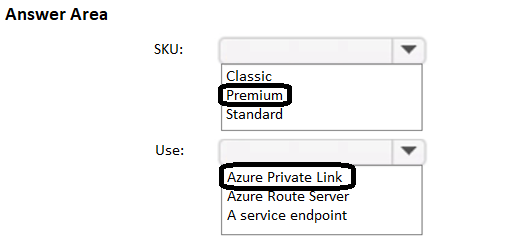
You need to identify which Front Door SKU to configure, and what to use to route the traffic to the load balancers. The solution must minimize costs.
What should you identify? To answer, select the appropriate options in the answer area.
NOTE: Each correct selection is worth one point.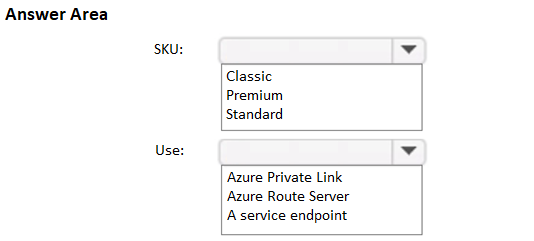
Answer:
Question 2
SIMULATION
Username and password
Use the following login credentials as needed:
To enter your username, place your cursor in the Sign in box and click on the username below.
To enter your password, place your cursor in the Enter password box and click on the password below.
Azure Username: [email protected]
Azure Password: xxxxxxxxxx
If the Azure portal does not load successfully in the browser, press CTRL-K to reload the
portal in a new browser tab.
The following information is for technical support purposes only:
Lab Instance: 12345678
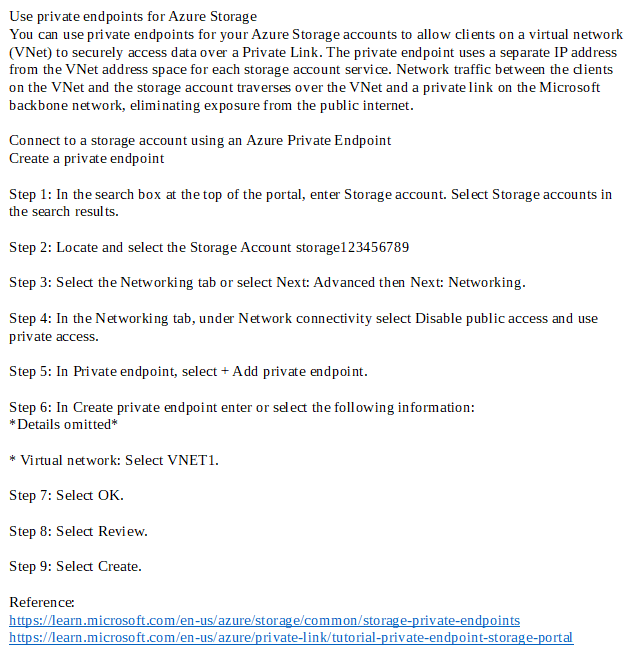
You need to ensure that only hosts on VNET1 can access the storage123456789 storage account. The solution must ensure that access occurs over the Azure backbone network.
To complete this task, sign in to the Azure portal.
Answer:
Question 3
You have an on-premises datacenter and an Azure subscription.
You plan to implement ExpressRoute FastPath.
You need to create an ExpressRoute gateway. The solution must minimize downtime if a single Azure datacenter fails.
Which SKU should you use?
- A. ErGw1AZ
- B. High performance
- C. Ultra performance
- D. ErGw3AZ
- E. ErGw2AZ
Answer:
d
Question 4
SIMULATION
Username and password
Use the following login credentials as needed:
To enter your username, place your cursor in the Sign in box and click on the username below.
To enter your password, place your cursor in the Enter password box and click on the password below.
Azure Username: [email protected]
Azure Password: xxxxxxxxxx
If the Azure portal does not load successfully in the browser, press CTRL-K to reload the
portal in a new browser tab.
The following information is for technical support purposes only:
Lab Instance: 12345678
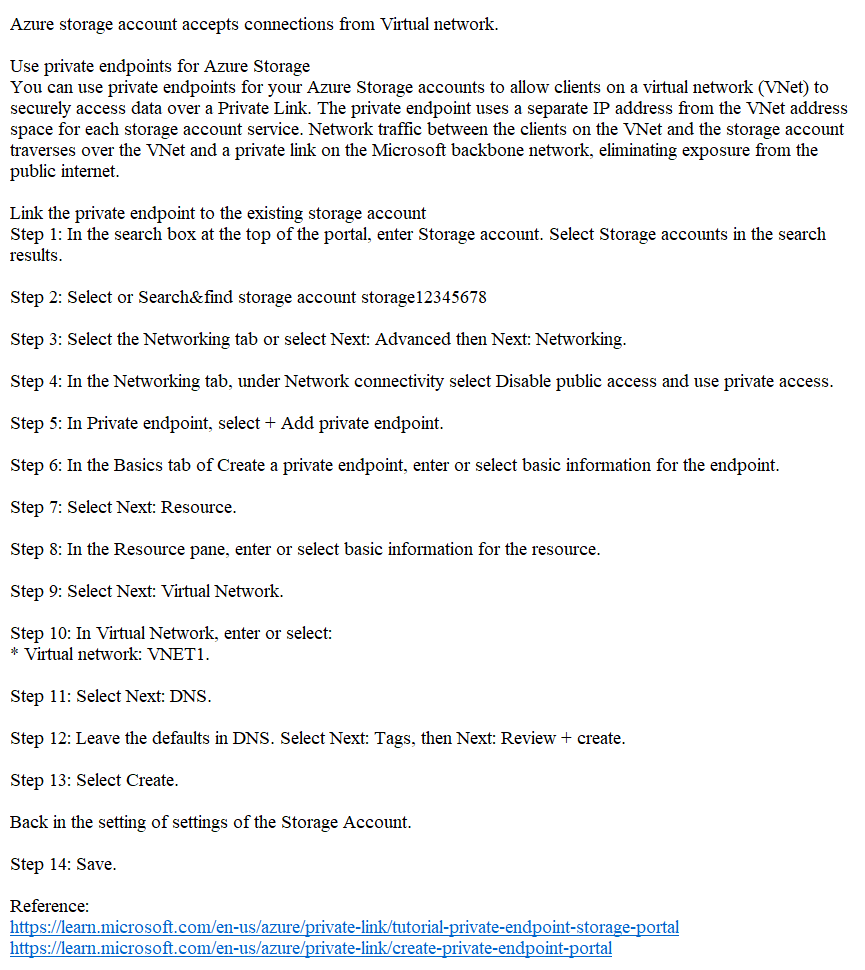
You need to ensure that the storage12345678 storage account will only accept connections from the hosts on VNET1.
To complete this task, sign in to the Azure portal.
Answer:
Question 5
Note: This question is part of a series of questions that present the same scenario. Each question in the series contains a unique solution that might meet the stated goals. Some question sets might have more than one correct solution, while others might not have a correct solution.
After you answer a question in this section, you will NOT be able to return to it. As a result, these questions will not appear in the review screen.
You have an Azure application gateway that has Azure Web Application Firewall (WAF) enabled.
You configure the application gateway to direct traffic to the URL of the application gateway.
You attempt to access the URL and receive an HTTP 403 error. You view the diagnostics log and discover the following error.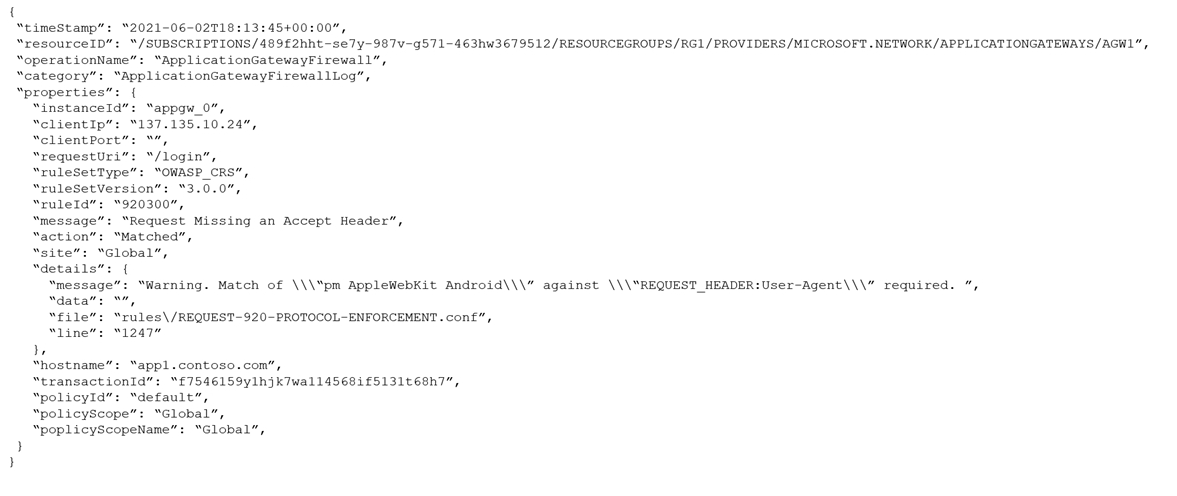
You need to ensure that the URL is accessible through the application gateway.
Solution: You disable the WAF rule that has a ruleId 920300.
Does this meet the goal?
- A. Yes
- B. No
Answer:
a
The log shows that WAF rule with ruleId 920300 was trigged. We should disable the WAF rule that has a ruleId 920300.
Reference:
https://docs.microsoft.com/en-us/azure/web-application-firewall/ag/web-application-firewall-troubleshoot
Question 6
SIMULATION
Username and password
Use the following login credentials as needed:
To enter your username, place your cursor in the Sign in box and click on the username below.
To enter your password, place your cursor in the Enter password box and click on the password below.
Azure Username: [email protected]
Azure Password: xxxxxxxxxx
If the Azure portal does not load successfully in the browser, press CTRL-K to reload the
portal in a new browser tab.
The following information is for technical support purposes only:
Lab Instance: 12345678
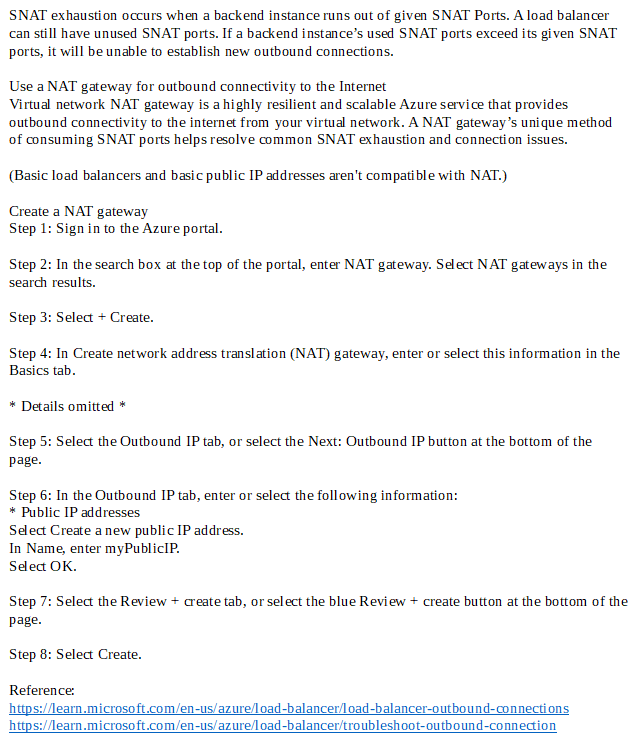
You plan to deploy 100 virtual machines to subnet-1. The virtual machines will NOT be assigned a public IP address. The virtual machines will call the same API which is hosted by a third party. The virtual machines will make more than 10,000 calls per minute to the API.
You need to minimize the risk of SNAT port exhaustion. The solution must minimize administrative effort.
To complete this task, sign in to the Azure portal.
Answer:
Question 7
HOTSPOT You have the hybrid network shown in the Network Diagram exhibit.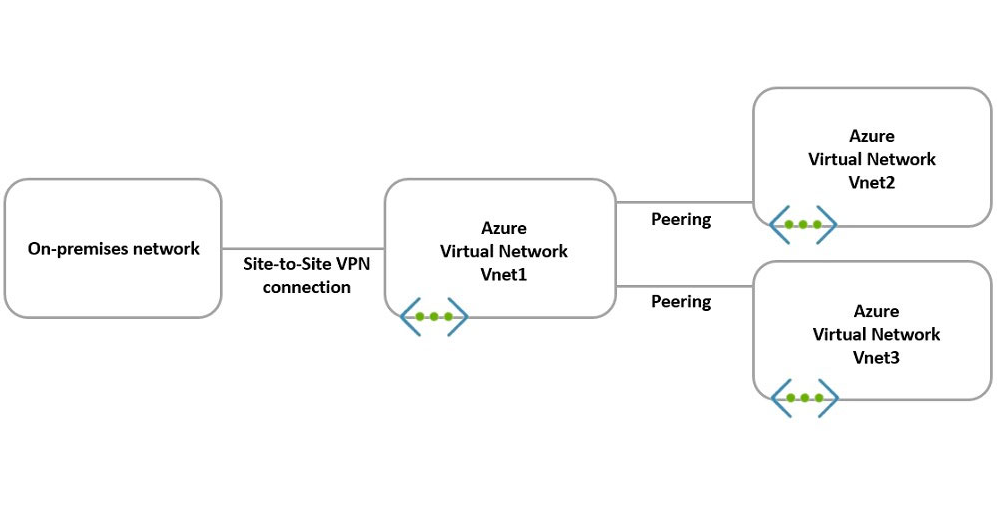
You have a peering connection between Vnet1 and Vnet2 as shown in the Peering-Vnet1-Vnet2 exhibit.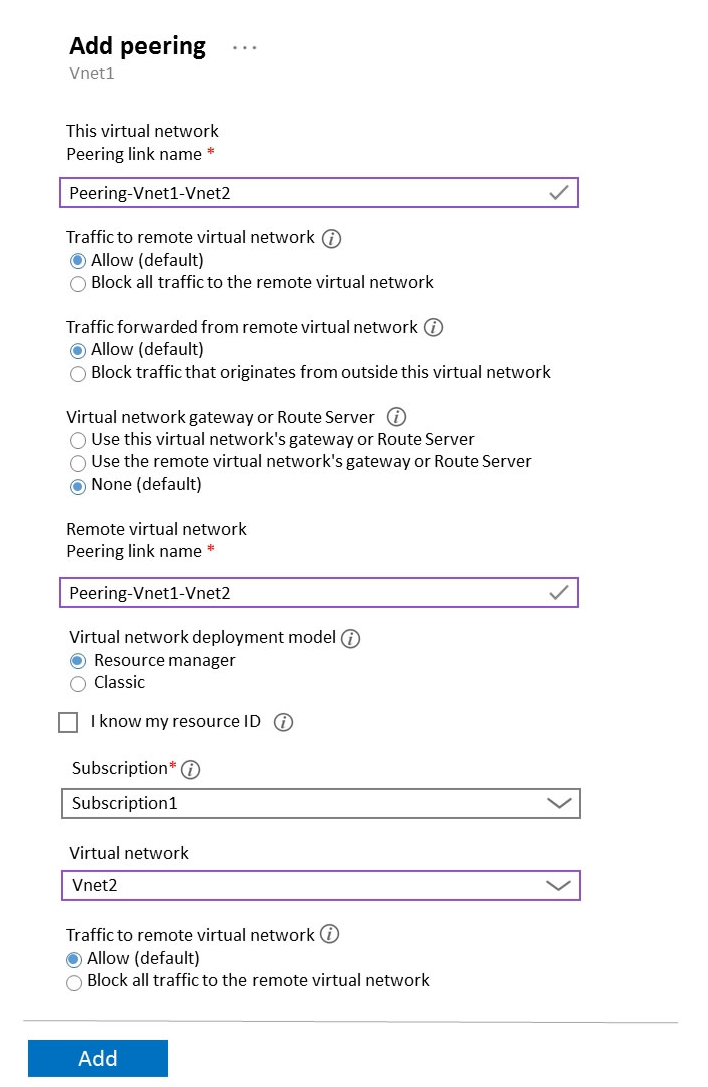
You have a peering connection between Vnet1 and Vnet3 as shown in the Peering-Vnet1-Vnet3 exhibit.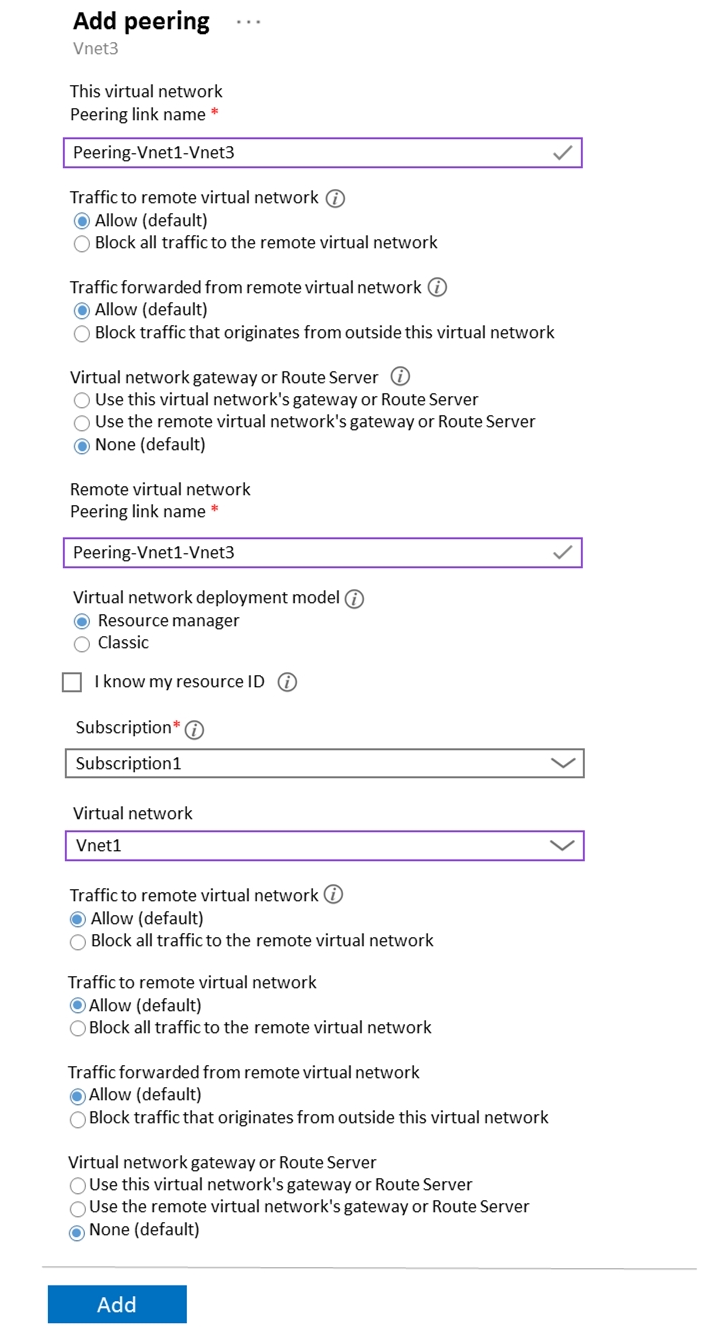
For each of the following statements, select Yes if the statement is true. Otherwise, select No.
NOTE: Each correct selection is worth one point.
Hot Area: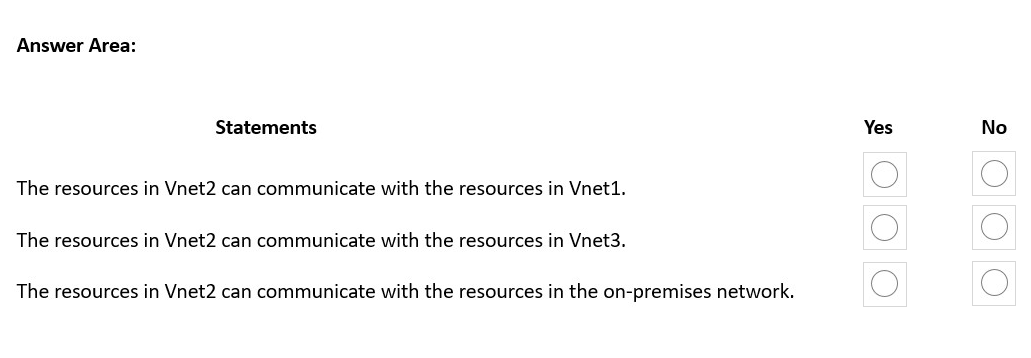
Answer:
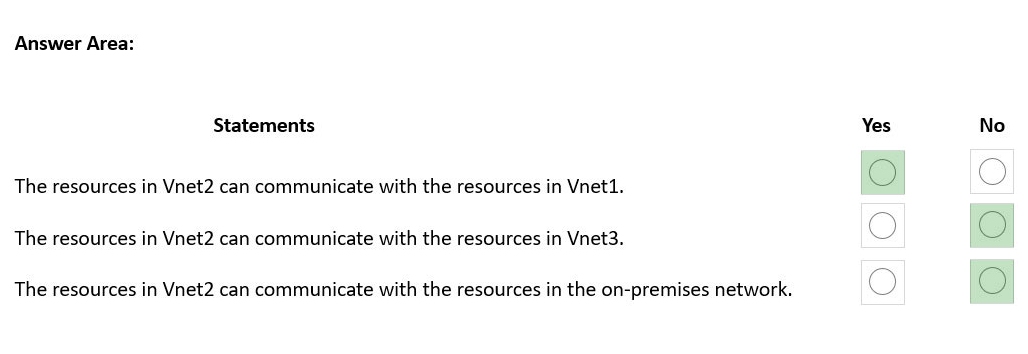
Box 1: Yes -
Virtual network peering seamlessly connects two Azure virtual networks, merging the two virtual networks into one for connectivity purposes.
Box 2: No -
No Virtual Gateway is used.
Gateway transit is a peering property that lets one virtual network use the VPN gateway in the peered virtual network for cross-premises or VNet-to-VNet connectivity. The following diagram shows how gateway transit works with virtual network peering.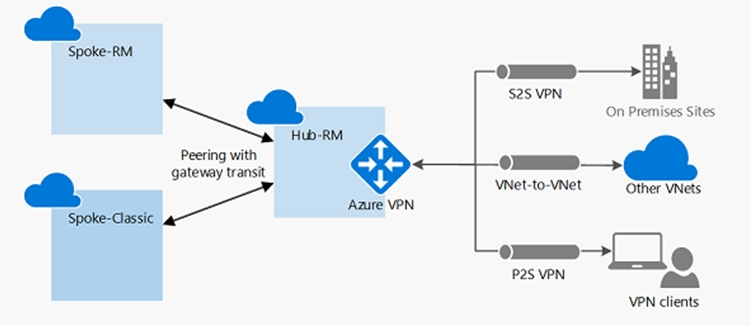
In the diagram, gateway transit allows the peered virtual networks to use the Azure VPN gateway in Hub-RM. Connectivity available on the VPN gateway, including S2S, P2S, and VNet-to-VNet connections, applies to all three virtual networks.
Box 3: No -
No Virtual Gateway is used.
Reference:
https://docs.microsoft.com/en-us/azure/vpn-gateway/vpn-gateway-peering-gateway-transit
Question 8
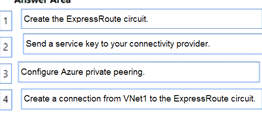
DRAG DROP
You have an on-premises network.
You have an Azure subscription that contains a virtual network named VNet1. VNet1 contains an ExpressRoute gateway.
You need to connect VNet1 to the on-premises network by using an ExpressRoute circuit.
Which four actions should you perform in sequence? To answer, move the appropriate actions from the list of actions to the answer area and arrange them in the correct order.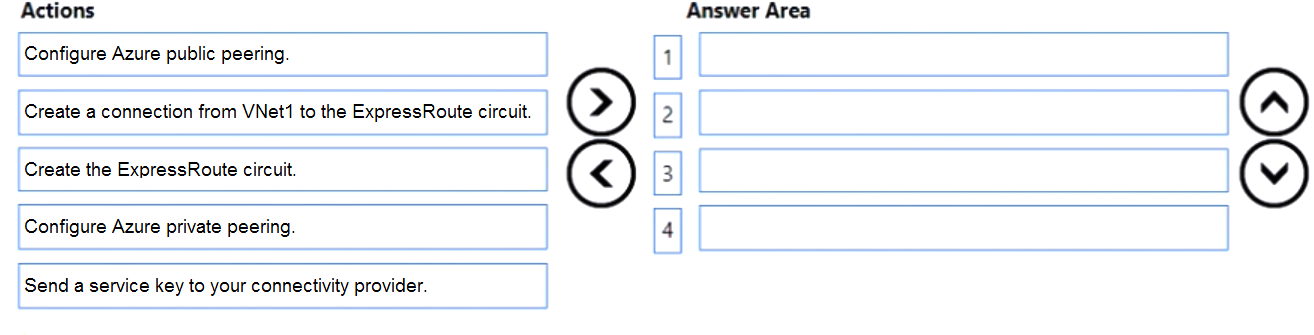
Answer:
Question 9
HOTSPOT You have an Azure private DNS zone named contoso.com that is linked to the virtual networks shown in the following table.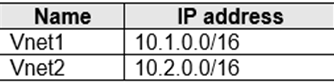
The links have auto registration enabled.
You create the virtual machines shown in the following table.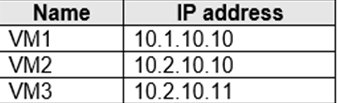
You manually add the following entry to the contoso.com zone:
Name: VM1
IP address: 10.1.10.9
For each of the following statements, select Yes if the statement is true. Otherwise, select No.
NOTE: Each correct selection is worth one point.
Hot Area: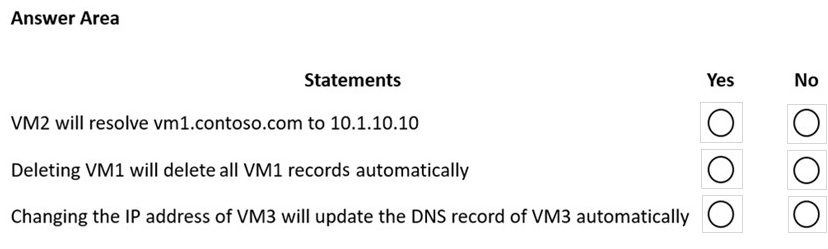
Answer:
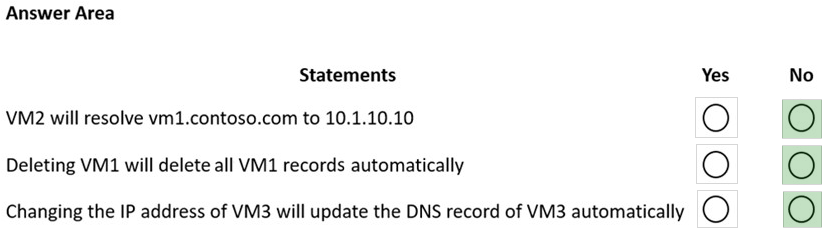
Box 1: No -
The manual DNS record will overwrite the auto-registered DNS record so VM1 will resolve to 10.1.10.9.
Box 2: No -
The DNS record for VM1 is now a manually created record rather than an auto-registered record. Only auto-registered DNS records are deleted when a VM is deleted.
Box 3: No -
This answer depends on how the IP address is changed. To change the IP address of a VM manually, you would need to select 'Static' as the IP address assignment. In this case, the DNS record will not be updated because only DHCP assigned IP addresses are auto-registered.
Reference:
https://docs.microsoft.com/en-us/azure/dns/dns-faq-private
Question 10
You have an Azure Private Link service named PL1 that uses an Azure load balancer named LB1.
You need to ensure that PL1 can support a higher volume of outbound traffic.
What should you do?
- A. Increase the number of frontend IP configurations for LB1.
- B. Increase the number of NAT IP addresses assigned to PL1.
- C. Deploy an Azure Application Gateway v2 instance to the source NAT subnet.
- D. Redeploy LB1 with a different SKU.
Answer:
b