microsoft az-140 practice test
Configuring and Operating Microsoft Azure Virtual Desktop
Question 1
DRAG DROP You need to ensure that you can implement user profile shares for the Boston office users. The solution must meet the user profile requirements.
Which four actions should you perform in sequence? To answer, move the appropriate actions from the list of actions to the answer area and arrange them in the correct order.
Select and Place: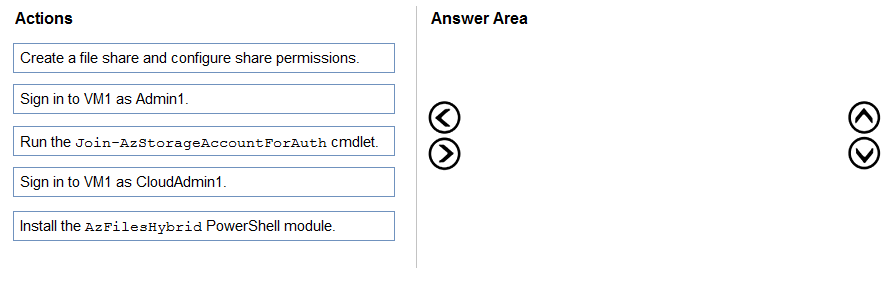
Answer:
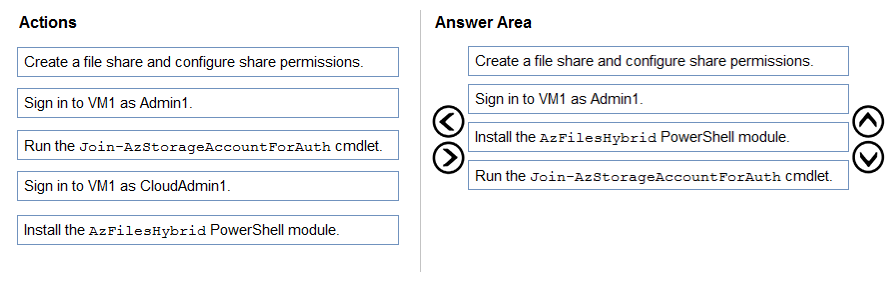
Reference:
https://www.christiaanbrinkhoff.com/2020/03/01/learn-here-how-to-configure-azure-files-with-active-directory-ad-authentication-for-fslogix-profile-container-and- msix-app-attach/
Question 2
You have an Azure Virtual Desktop deployment.
You deploy and configure Azure Virtual Desktop in a secondary location.
You plan to perform a test failover to the secondary location, but discover existing user sessions to the primary location.
You need to sign out users from the session hosts in the primary location.
Which PowerShell cmdlet should you run?
- A. Invoke-RdsUserSessionLogoff
- B. Remove-AzWvdUserSession
- C. Invoke-RestMethod
- D. Remove-Alias
Answer:
b
Reference:
https://docs.microsoft.com/en-us/azure/virtual-desktop/disaster-recovery
Question 3
Note: This question is part of a series of questions that present the same scenario. Each question in the series contains a unique solution that might meet the stated goals. Some question sets might have more than one correct solution, while others might not have a correct solution.
After you answer a question in this section, you will NOT be able to return to it. As a result, these questions will not appear in the review screen.
You have the following:
A Microsoft 365 E5 tenant
An on-premises Active Directory domain
A hybrid Azure Active Directory (Azure AD) tenant
An Azure Active Directory Domain Services (Azure AD DS) managed domain
An Azure Virtual Desktop deployment
The Azure Virtual Desktop deployment contains personal desktops that are hybrid joined to the on-premises domain and enrolled in Microsoft Intune.
You need to configure the security settings for the Microsoft Edge browsers on the personal desktops.
Solution: You create and configure a Group Policy Object (GPO) in the on-premises domain.
Does this meet the goal?
- A. Yes
- B. No
Answer:
a
Reference:
https://www.compete366.com/blog-posts/eight-tips-on-how-to-manage-azure-virtual-desktop-avd/
Question 4
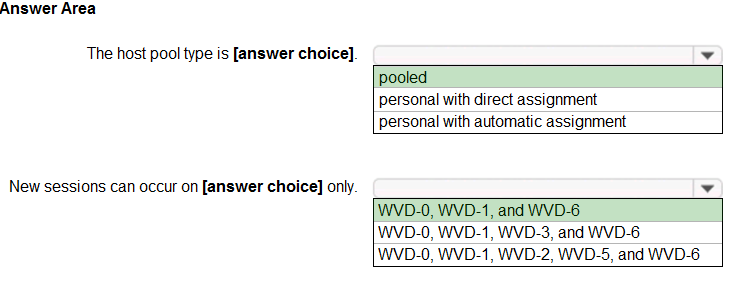
HOTSPOT You have a Azure Virtual Desktop host pool that has a max session limit of 15. Disconnected sessions are signed out immediately.
The session hosts for the host pool are shown in the following exhibit.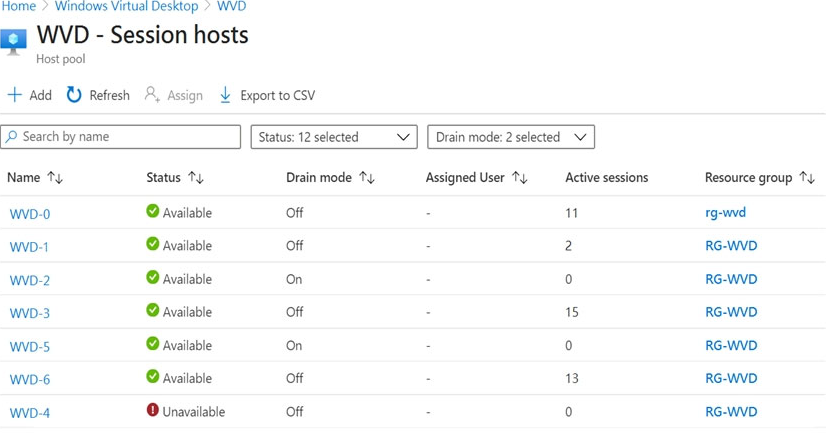
Use the drop-down menus to select the answer choice that completes each statement based on the information presented in the graphic.
NOTE: Each correct selection is worth one point.
Hot Area: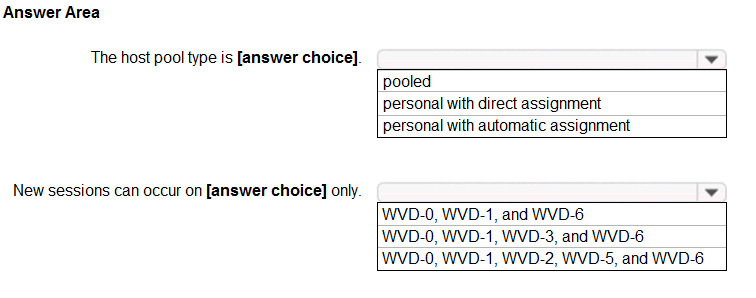
Answer:
Reference:
https://docs.microsoft.com/en-us/azure/virtual-desktop/set-up-scaling-script
Question 5
You plan to deploy Azure Virtual Desktop session host virtual machines based on a preconfigured master image. The master image will be stored in a shared image gallery.
You create a virtual machine named Image1 to use as the master image. You install applications and apply configuration changes to Image1.
You need to ensure that the new session host virtual machines created based on Image1 have unique names and security identifiers.
What should you do on Image1 before you add the image to the shared image gallery?
- A. At a command prompt, run the set computername command.
- B. At a command prompt, run the sysprep command.
- C. From PowerShell, run the rename-computer cmdlet.
- D. From the lock screen of the Windows device, perform a Windows Autopilot Reset.
Answer:
b
Reference:
https://docs.microsoft.com/en-us/azure/virtual-machines/windows/prepare-for-upload-vhd-image#determine-when-to-use-sysprep
Question 6
You have an Azure Virtual Desktop deployment and the users shown in the following table.
All the users plan to use a web browser to access Azure Virtual Desktop resources.
Which users can connect to Azure Virtual Desktop by using their preferred browser?
- A. User2 only
- B. User1 only
- C. User1, User2, and User3
- D. User2 and User3 only
- E. User1 and User2 only
Answer:
c
Connect to Azure Virtual Desktop with the web client, supported browsers.
While any HTML5-capable browser should work, we officially support the following operating systems and browsers:
Mozilla Firefox - Windows, macOS, Linux (User1)
Apple Safari - macOS (User3)
Note: There is no answer option for User1 and User3 only, so we go for User1, User2 and User3.
Incorrect:
Internet Explorer not supported (not User2)
As of September 30, 2021, the Azure Virtual Desktop web client no longer supports Internet Explorer. We recommend that you use Microsoft Edge to connect to the web client instead.
Reference:
https://docs.microsoft.com/en-us/azure/virtual-desktop/user-documentation/connect-web
Question 7
HOTSPOT
You have an Azure Virtual Desktop deployment that contains the resources shown in the following table.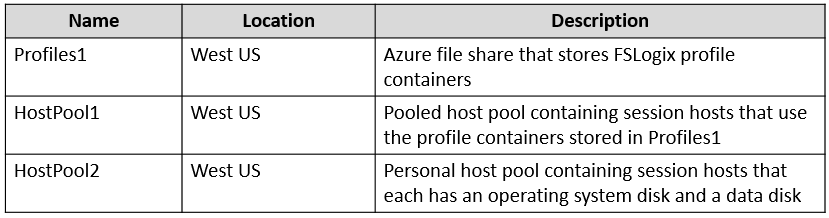
You create the resources shown in the following table.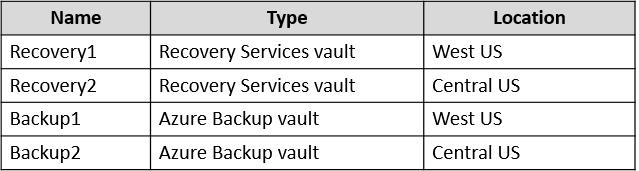
You need to meet following requirements:
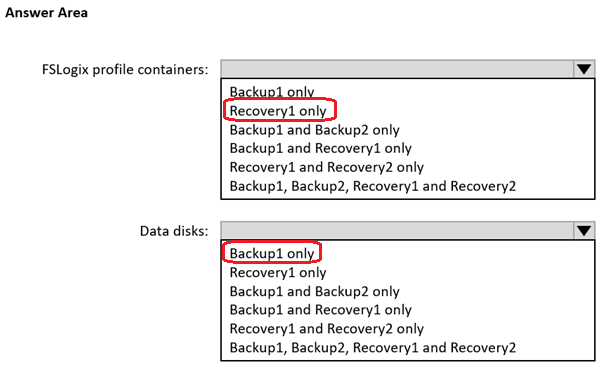
Back up the FSLogix profile containers used by HostPool1.
Backup the data disks in HostPool2.
To which resources can you back up the profile containers and the data disks? To answer, select the appropriate options in the answer area.
NOTE: Each correct selection is worth one point.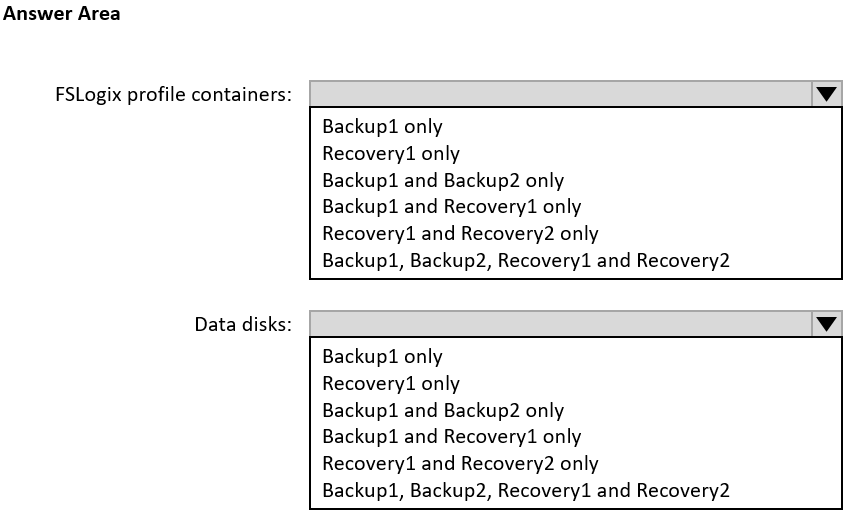
Answer:
Question 8
Note: This question is part of a series of questions that present the same scenario. Each question in the series contains a unique solution that might meet the stated goals. Some question sets might have more than one correct solution, while others might not have a correct solution.
After you answer a question in this section, you will NOT be able to return to it. As a result, these questions will not appear in the review screen.
You have an Azure Virtual Desktop host pool that contains five session hosts. The session hosts run Windows 10 Enterprise multi-session.
You need to prevent users from accessing the internet from Azure Virtual Desktop sessions. The session hosts must be allowed to access all the required
Microsoft services.
Solution: You modify the IP configuration of each session host.
Does this meet the goal?
- A. Yes
- B. No
Answer:
b
Question 9
DRAG DROP You plan to deploy Azure Virtual Desktop.
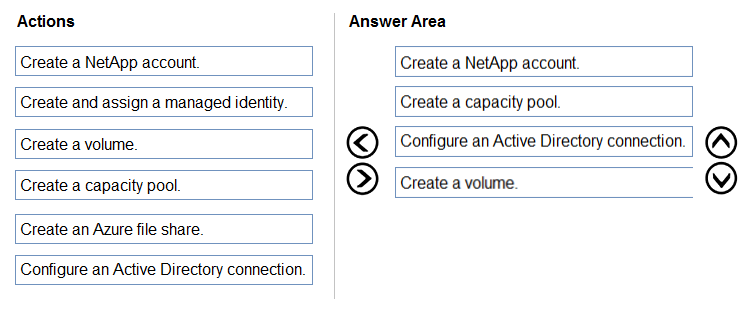
You need to create Azure NetApp Files storage to store FSLogix profile containers.
Which four actions should you perform in sequence after you register the NetApp Resource Provider? To answer, move the appropriate actions from the list of actions to the answer area and arrange them in the correct order.
NOTE: More than one order of answer choices is correct. You will receive credit for any of the correct orders you select.
Select and Place: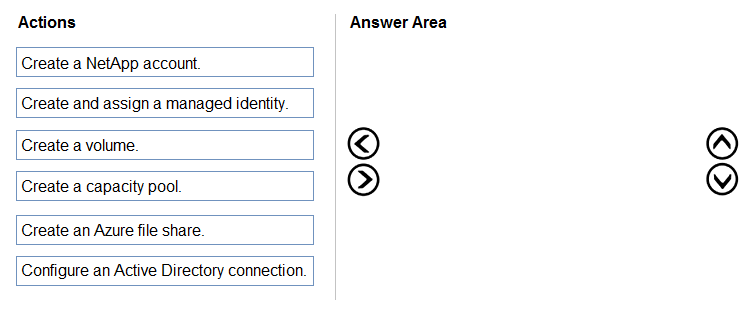
Answer:
Reference:
https://docs.microsoft.com/en-us/azure/virtual-desktop/create-fslogix-profile-container#make-sure-userscan-access-the-azure-netapp-file-share https://docs.microsoft.com/en-us/azure/azure-netapp-files/azure-netapp-files-quickstart-set-up-account-create-volumes?tabs=azure-portal
Question 10
You have an Azure Virtual Desktop deployment that contains a host pool. The pool has the following settings:
* Resource group: RG1
* Host pool name: Pool1
* Location: East US
* Host pool type: Pooled
The deployment contains the workspaces shown in the following table.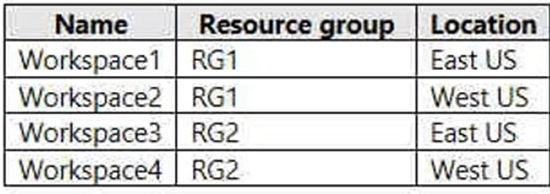
For Pool1, you plan to create a RemoteApp application group named AppGroup1.
In which workspaces can you register AppGroup1?
- A. Workspace1 and Workspace2 only
- B. Workspace1 and Workspace3 only
- C. Workspace1 only
- D. Workspace1, Workspace2, Workspace3, and Workspace4
Answer:
b
You can only register the app group to workspaces created in the same location as the host pool. Also. if you've previously registered another app group from the same host pool as your new app group to a workspace, it will be selected and you can't edit it. All app groups from a host pool must be registered to the same workspace.
Reference:
https://docs.microsoft.com/en-us/azure/virtual-desktop/manage-app-groups