LPI 010-160 practice test
Linux Essentials Certificate Exam, version 1.6
Question 1
What are the differences between hard disk drives and solid state disks? (Choose two correct
answers.)
- A. Hard disks have a motor and moving parts, solid state disks do not.
- B. Hard disks can fail due to physical damage, while solid state disks cannot fail.
- C. Solid state disks can store many times as much data as hard disk drives.
- D. /dev/sda is a hard disk device while /dev/ssda is a solid state disk.
- E. Solid state disks provide faster access to stored data than hard disks.
Answer:
AE
Explanation:
The main difference between hard disk drives (HDDs) and solid state drives (SSDs) is the way they
store and access data. HDDs use a spinning disk (platter) and a moving head to read and write data,
while SSDs use flash memory chips that have no moving parts. This makes SSDs faster, quieter, and
more durable than HDDs, but also more expensive and less spacious. HDDs and SSDs are both I/O
devices that can be used to boot the system and store data, but they have different advantages and
disadvantages depending on the use case. Reference:
Difference between Hard Disk Drive (HDD) and Solid State Drive (SSD)
Hard Disk Drive (HDD) vs. Solid State Drive (SSD): What’s the Difference?
How to Check Whether Your Disk Is an SSD or HDD on Linux
Question 2
Reverse DNS assigns hostnames to IP addresses. How is the name of the IP address 198.51.100.165
stored
on a DNS server?
- A. In the A record for 165.100.51.198.ipv4.arpA.
- B. In the PTR record for 165.100.51.198.in-addr.arpA.
- C. In the RNAME record for 198-51-100-165.rev.arpA.
- D. In the ARPA record for 165.100.51.198.rev.
- E. In the REV record for arpA.in-addr.198.51.100.165.
Answer:
B
Explanation:
Reverse DNS lookups query DNS servers for a PTR (pointer) record; if the server does not have a PTR
record, it cannot resolve a reverse lookup. PTR records store IP addresses with their segments
reversed, and they append “.in-addr.arpa” to that. For example, if a domain has an IP address of
192.0.2.1, the PTR record will store the domain’s information under 1.2.0.192.in-addr.arpa.
In IPv6,
the latest version of the Internet Protocol, PTR records are stored within the “.ip6.arpa” domain
instead of ".in-addr.arpa."1 Therefore, the name of the IP address 198.51.100.165 is stored in the PTR
record for 165.100.51.198.in-addr.arpa. Reference: 1: Reverse DNS lookup - Wikipedia 1
Question 3
Which of the following types of bus can connect hard disk drives with the motherboard?
- A. The RAM bus
- B. The NUMA bus
- C. The CPU bus
- D. The SATA bus
- E. The Auto bus
Answer:
D
Explanation:
A bus is a communication system that transfers data between components inside a computer or
between computers. There are different types of buses that serve different purposes. The RAM bus
connects the CPU with the main memory, the NUMA bus connects multiple processors in a
multiprocessor system, the CPU bus connects the CPU with other components on the motherboard,
and the Auto bus is a fictional bus that can transform into a robot. The SATA bus is the correct answer
because it is a type of bus that can connect hard disk drives with the motherboard. SATA stands for
Serial Advanced Technology Attachment and it is a standard interface for connecting storage devices
such as hard disk drives, solid state drives, and optical drives. SATA offers faster data transfer rates,
lower power consumption, and improved cable management compared to older interfaces such as
IDE and SCSI. Reference: : [Bus (computing)] : [Transformers: Robots in Disguise (2015 TV series)] :
[Serial ATA]3) : [SATA vs. IDE: What’s the Difference?]
Question 4
Members of a team already have experience using Red Hat Enterprise Linux. For a small hobby
project, the team wants to set up a Linux server without paying for a subscription. Which of the
following Linux distributions allows the team members to apply as much of their Red Hat Enterprise
Linux knowledge as possible?
- A. Ubuntu Linux LTS
- B. Raspbian
- C. Debian GNU/Linux
- D. CentOS
- E. openSUSE
Answer:
D
Explanation:
CentOS is a Linux distribution that is based on the source code of Red Hat Enterprise Linux (RHEL). It
is a free and open-source community-supported OS that provides an enterprise-level computing
platform. CentOS is fully compatible with RHEL and can run the same applications and packages.
Therefore, CentOS allows the team members to apply as much of their Red Hat Enterprise Linux
knowledge as possible for their hobby project. Reference:
Linux Essentials Version 1.6 Objectives1
, Topic 1.1: Linux Evolution and Popular Operating Systems,
Subtopic: Linux Distributions
Linux Essentials Version 1.6 Exam Preparation Guide2
, Section 1.1: Linux Evolution and Popular
Operating Systems, Page 7
CentOS Website3
, About CentOS Linux
Red Hat Enterprise Linux derivatives - Wikipedia4
Question 5
What information can be displayed by top?
- A. Existing files, ordered by their size.
- B. Running processes, ordered by CPU or RAM consumption.
- C. User accounts, ordered by the number of logins.
- D. User groups, ordered by the number of members.
- E. User accounts, ordered by the number of files.
Answer:
B
Explanation:
The top command is a Linux command that shows the running processes on the system. It provides a
dynamic real-time view of the system performance and resource usage. The top command can
display various information about the processes, such as their process ID, user, priority, state, CPU
and memory usage, command name, and more. The top command can also sort the processes by
different criteria, such as CPU or RAM consumption, by using the interactive commands. The top
command is useful for monitoring the system load and identifying the processes that are consuming
the most resources. Reference:
Linux Essentials Topic 104: The Linux Operating System
, section 104.3: Basic features and commands
of the Linux standard shells.
Linux Essentials Topic 106: Security and File Permissions
, section 106.4: Monitor and manage Linux
processes.
Question 6
Which of the following commands can be used to resolve a DNS name to an IP address?
- A. dnsname
- B. dns
- C. query
- D. host
- E. iplookup
Answer:
D
Explanation:
The host command is used to resolve a DNS name to an IP address or vice versa. It can also perform
other DNS queries, such as finding the mail servers for a domain. The host command has the
following syntax: host [options] [name] [server]. The name argument can be a hostname, such as
www.lpi.org, or an IP address, such as 192.168.0.1. The server argument is optional and specifies the
name or IP address of the DNS server to query. If no server is given, the default system resolver is
used. Reference:
Linux Essentials Version 1.6 Objectives: 1.4.1.
Demonstrate an understanding of the purpose and
types of DNS records1
Linux Essentials Version 1.6 Exam Study Resources: Linux Essentials Manual - Chapter 10. Network
Fundamentals - 10.3. DNS and Hostname Resolution - 10.3.1.
The host Command2
Linux Essentials Version 1.6 Exam Study Resources: Linux Essentials Manual - Appendix A. Answers to
the Exercises - Chapter 10. Network Fundamentals - 10.3.
DNS and Hostname Resolution - Exercise
10.3.12
Question 7
Which of the following outputs comes from the command free?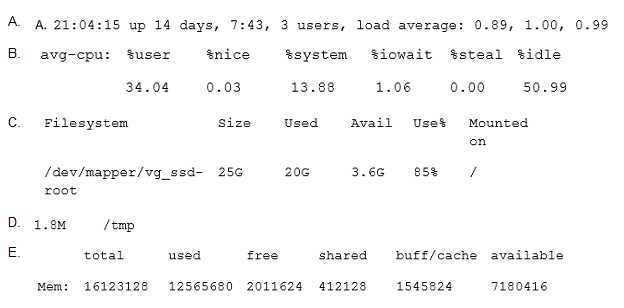
- A. Option A
- B. Option B
- C. Option C
- D. Option D
- E. Option E
Answer:
E
Question 8
What is true about the dmesg command? (Choose two correct answers.)
- A. It traces the execution of a command and shows each step the program carries out.
- B. It sends messages to the command lines of all current user sessions.
- C. It displays the content of the Linux kernel’s ring buffer.
- D. It immediately outputs all new messages written to the system journal.
- E. It might not display older information because it was overwritten by newer information.
Answer:
CE
Explanation:
The dmesg command is used to display the messages from the kernel that are stored in a ring buffer.
A ring buffer is a fixed-size data structure that overwrites the oldest entries when it is full. Therefore,
the dmesg command might not display older information because it was overwritten by newer
information. The dmesg command is useful for troubleshooting system issues and checking hardware
information. The dmesg command is not used to trace the execution of a command, send messages
to user sessions, or output the system journal. Those functions are performed by other commands
such as strace, write, and journalctl respectively. Reference: : [dmesg] : [Ring buffer] : [strace] : [write
(Unix)] : [journalctl]4)
Question 9
Which of the following outputs could stem from the command last?
- A. 1 ls 2 cat text.txt 3 logout
- B. Password for user last changed at Sat Mar 31 16:38:57 EST 2018
- C. Last login: Fri Mar 23 10:56:39 2018 from server.example.com
- D. EXT4-fs (dm-7): mounted filesystem with ordered data mode. Opts: (null)
- E. root tty2 Wed May 17 21:11 - 21:11 (00:00)
Answer:
E
Explanation:
The last command in Linux is used to display the list of all the users logged in and out since the
file /var/log/wtmp was created1
.
The output of the last command shows the username, the
terminal, the IP address, the login time and date, and the duration of the session for each record2
.
The option E is the only one that matches this format. The other options are not related to the last
command. Option A shows a list of commands executed by a user. Option B shows the password
change information for a user. Option C shows the last login information for a user. Option D shows
the mount information for a filesystem. Reference:
Linux Essentials Version 1.6 Objectives3
, Topic 1.4: Command Line Basics, Subtopic: Basic Shell
Commands
Linux last Command Tutorial for Beginners (8 Examples)4
Linux Essentials Version 1.6 Exam Preparation Guide, Section 1.4: Command Line Basics, Page 16
Question 10
What is the UID of the user root?
- A. 1
- B. -1
- C. 255
- D. 65536
- E. 0
Answer:
E
Explanation:
The UID of the user root is always 0 on Linux systems. This is because the kernel uses the UID 0 to
check for the superuser privileges and grant access to all system resources. The name of the user
account with UID 0 is usually root, but it can be changed or have aliases. However, some applications
may expect the name root and not work properly with a different name. The UID 0 is reserved for the
root user and cannot be assigned to any other user. The UID 0 is stored in the /etc/passwd file along
with other user information. Reference:
Linux Essentials Topic 104: The Linux Operating System
, section 104.4: Runlevels and Boot Targets.
Linux Essentials Topic 106: Security and File Permissions
, section 106.1: Basic security and identifying
user types.
Linux Essentials Topic 106: Security and File Permissions
, section 106.2: Creating users and groups.
Question 11
Which permissions are set on a regular file once the permissions have been modified with the
command
chmod 654 file.txt?
- A. drw-r-xr--
- B. d—wxr-x--
- C. –wxr-x--x
- D. –rwxrw---x
- E. -rw-r-xr--
Answer:
E
Explanation:
The chmod command is used to change the permissions of files and directories. The permissions are
represented by three sets of three characters, indicating the permissions for the owner, the group,
and the others. Each character can be either r (read), w (write), x (execute), or - (no permission). The
chmod command can use either symbolic or numeric mode to specify the permissions. In this
question, the numeric mode is used, which consists of three digits from 0 to 7. Each digit is the sum
of the permissions for each set, where r is 4, w is 2, and x is 1. For example, 7 means rwx, 6 means
rw-, and 4 means r–. Therefore, the command chmod 654 file.txt sets the permissions as follows:
The first digit 6 means rw- for the owner, which means the owner can read and write the file, but not
execute it.
The second digit 5 means r-x for the group, which means the group can read and execute the file, but
not write it.
The third digit 4 means r-- for the others, which means the others can only read the file, but not write
or execute it.
The resulting permissions are -rw-r-xr–, which is the correct answer. The other options are incorrect
because they either have the wrong permissions or the wrong file type. A regular file does not have
the d (directory) prefix, and a directory cannot have the - (no file type) prefix. Reference:
Linux Essentials Version 1.6 Objectives: 4.1.
Ownership and Permissions1
Linux Essentials Version 1.6 Exam Study Resources: Linux Essentials Manual - Chapter 8. Security and
File Permissions - 8.1. Ownership and Permissions - 8.1.1.
The chmod Command2
Linux Essentials Version 1.6 Exam Study Resources: Linux Essentials Manual - Appendix A. Answers to
the Exercises - Chapter 8. Security and File Permissions - 8.1.
Ownership and Permissions - Exercise
8.1.12
Question 12
What is true about the owner of a file?
- A. Each file is owned by exactly one user and one group.
- B. The owner of a file always has full permissions when accessing the file.
- C. The user owning a file must be a member of the file’s group.
- D. When a user is deleted, all files owned by the user disappear.
- E. The owner of a file cannot be changed once it is assigned to an owner.
Answer:
A
Explanation:
In Linux, every file and directory is associated with an owner and a group. The owner is the user who
created the file or directory, and the group is the group to which the owner belongs. Therefore, each
file is owned by exactly one user and one group. This is true for option A. The other options are false
for the following reasons:
Option B: The owner of a file does not always have full permissions when accessing the file. The
permissions are determined by the file mode, which can be changed by the owner or the root user.
The file mode specifies the read, write, and execute permissions for the owner, the group, and
others. The owner can have different permissions than the group or others.
Option C: The user owning a file does not have to be a member of the file’s group. The owner can
change the group ownership of the file to any group on the system, regardless of whether the owner
belongs to that group or not. However, only the root user or a user with the CAP_CHOWN capability
can change the group ownership to a group that the owner is not a member of.
Option D: When a user is deleted, all files owned by the user do not disappear. The files remain on
the system, but their owner is changed to an invalid user ID (UID). The files can still be accessed by
the group or others, depending on the permissions. The files can also be reclaimed by the root user
or a user with the CAP_CHOWN capability, who can change the owner to a valid user.
Option E: The owner of a file can be changed once it is assigned to an owner. The owner can transfer
the ownership to another user, or the root user or a user with the CAP_CHOWN capability can
change the owner to any user on the system.
The command to change the owner of a file is
chown. Reference: 1: Chown Command in Linux (File Ownership) | Linuxize 2 3: Linux File
Permissions and Ownership Explained with Examples 4 2: 3 Ways to Find File Owner in Linux -
howtouselinux 1
Question 13
Which of the following permissions are set on the /tmp/ directory?
- A. rwxrwxrwt
- B. ------rwX
- C. rwSrw-rw-
- D. rwxrwS---
- E. r-xr-X--t
Answer:
A
Explanation:
The correct permissions for the /tmp directory are rwxrwxrwt, which means that the owner, group,
and others have read, write, and execute permissions, and that the sticky bit is set. The sticky bit is a
special permission that prevents users from deleting or renaming files that they do not own in a
shared directory. The /tmp directory is used for storing temporary files that may be created by
different users and processes, so it needs to be accessible and writable by all, but also protected
from unauthorized deletion or modification of files. The rwxrwxrwt permissions can be set by using
the chmod command with either the octal mode 1777 or the symbolic mode a+trwx. Reference: :
[File system permissions] : [Sticky bit] : [chmod]
Question 14
Which command adds the new user tux and creates the user’s home directory with default
configuration
files?
- A. defaultuser tux
- B. useradd –m tux
- C. usercreate tux
- D. useradd –o default tux
- E. passwd –a tux
Answer:
B
Explanation:
The useradd command in Linux is used to create new user accounts on the system1
.
The -m option
tells the command to create the user’s home directory as /home/username and copy the files from
/etc/skel directory to the user’s home directory2
.
The /etc/skel directory contains the default
configuration files for new users3
. Therefore, the command useradd -m tux will add the new user tux
and create the user’s home directory with default configuration files. The other options are either
invalid or do not create the user’s home directory. Reference:
Linux Essentials Version 1.6 Objectives, Topic 1.4: Command Line Basics, Subtopic: Basic Shell
Commands
Linux Essentials Version 1.6 Exam Preparation Guide, Section 1.4: Command Line Basics, Page 16
Linux useradd Command Tutorial for Beginners (15 Examples)
Question 15
What information is stored in /etc/passwd? (Choose three correct answers.)
- A. The user’s storage space limit
- B. The numerical user ID
- C. The username
- D. The encrypted password
- E. The user\s default shell
Answer:
BCE
Explanation:
The /etc/passwd file is a plain text-based database that contains information for all user accounts on
the system. It is owned by root and has 644 permissions. The file can only be modified by root or
users with sudo privileges and readable by all system users. Each line of the /etc/passwd file contains
seven comma-separated fields, representing a user account. The fields are as follows:
Username: The string you type when you log into the system. Each username must be a unique string
on the machine. The maximum length of the username is restricted to 32 characters.
Password: In older Linux systems, the user’s encrypted password was stored in the /etc/passwd file.
On most modern systems, this field is set to x, and the user password is stored in the /etc/shadow
file.
User ID (UID): The user identifier is a number assigned to each user by the operating system to refer
to a user. It is used by the kernel to check for the user privileges and grant access to system
resources. The UID 0 is reserved for the root user and cannot be assigned to any other user.
Group ID (GID): The user’s group identifier number, referring to the user’s primary group. When a
user creates a file, the file’s group is set to this group. Typically, the name of the group is the same as
the name of the user. User’s secondary groups are listed in the /etc/group file.
User ID Info (GECOS): This is a comment field. This field contains a list of comma-separated values
with the following information: User’s full name or the application name, Room number, Work
phone number, Home phone number, Other contact information.
Home directory: The absolute path to the user’s home directory. It contains the user’s files and
configurations. By default, the user home directories are named after the name of the user and
created under the /home directory.
Login shell: The absolute path to the user’s login shell. This is the shell that is started when the user
logs into the system. On most Linux distributions, the default login shell is Bash.
Therefore, the correct answers are B, C, and E. The user’s storage space limit (A) is not stored in the
/etc/passwd file, but in the /etc/quota file. The encrypted password (D) is not stored in the
/etc/passwd file, but in the /etc/shadow file. Reference:
Linux Essentials Topic 104: The Linux Operating System
, section 104.4: Runlevels and Boot Targets.
Linux Essentials Topic 106: Security and File Permissions
, section 106.1: Basic security and identifying
user types.
Linux Essentials Topic 106: Security and File Permissions
, section 106.2: Creating users and groups.
Understanding the /etc/passwd File | Linuxize
Understanding the /etc/passwd File - GeeksforGeeks
passwd(5) - Linux manual page - man7.org
Understanding /etc/passwd file in Linux - DEV Community
A. Hard disks have a motor and moving parts, solid state disks do not.
E. Solid state disks provide faster access to stored data than hard disks.