cisco 500-220 practice test
Cisco Meraki Solutions Specialist
Question 1
DRAG DROP
Drag and drop the descriptions from the left onto the corresponding MX operation mode on the
right.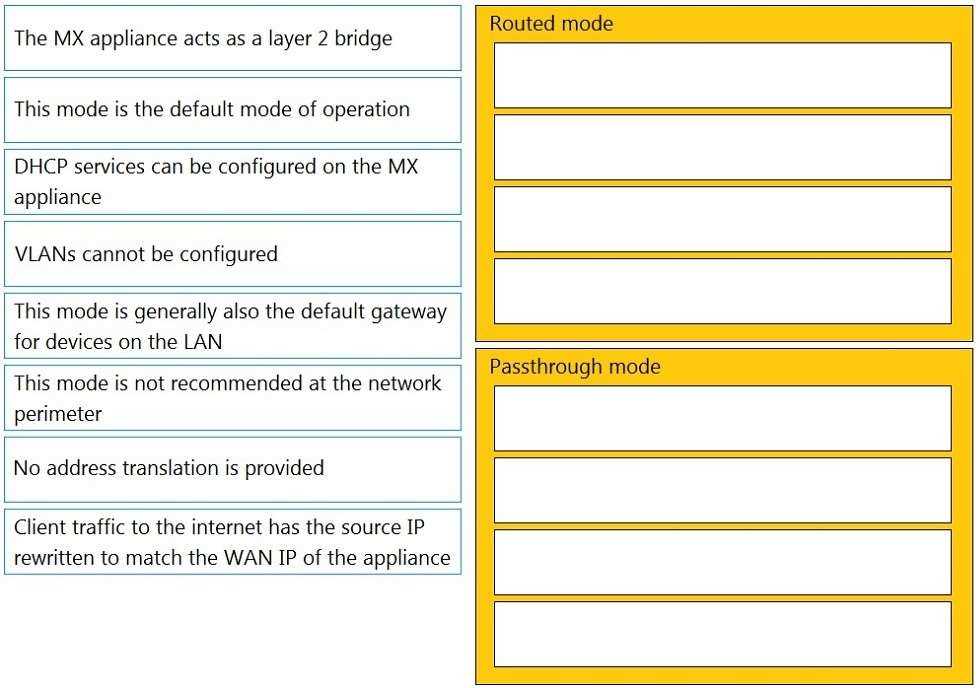
Answer:
Explanation:
Routed Mode:
This mode is the default mode of operation
This mode is generally also the default gateway for devices on the LAN
Client traffic to the internet has the source IP rewritten to match the WAN IP of the appliance
DHCP services can be configured on the MX appliance
Passthrough Mode:
The MX appliance acts as a layer 2 bridge
VLANs cannot be configured
No address translation is provided
This mode is not recommended at the network perimeter
This question is related to the topic of MX Addressing and VLANs in the Cisco Meraki documentation.
You can find more information about this topic in the
MX Addressing and VLANs
article or
the
General MX Best Practices
page.
Question 2
When an SSID is configured with Sign-On Splash page enabled, which two settings must be
configured for unauthenticated clients to have full network access and not be allow listed? (Choose
two.)
- A. Controller disconnection behavior
- B. Captive Portal strength
- C. Simultaneous logins
- D. Firewall & traffic shaping
- E. RADIUS for splash page settings
Answer:
AB
Explanation:
To clarify, when an SSID is configured with Sign-On Splash page enabled, the two settings that must
be configured for unauthenticated clients to have full network access and not be allow listed are:
Controller disconnection behavior: This setting determines how the clients are treated when the
Meraki cloud controller is unreachable. The options are Restricted or Unrestricted. The former option
blocks all traffic from unauthenticated clients until the controller is reachable again.
The latter option
allows unauthenticated clients to access the network without signing on until the controller is
reachable again1
.
Captive Portal strength: This setting determines how often the clients are redirected to the splash
page for authentication. The options are Block all access until sign-on is complete or Allow non-HTTP
traffic prior to sign-on. The latter option allows unauthenticated clients to access other protocols
such as DNS, DHCP, ICMP, etc., but blocks HTTP and HTTPS traffic until they sign on.
This option is
recommended for compatibility with devices that do not support web-based authentication1
.
Reference: https://documentation.meraki.com/MR/Access_Control
Question 3
Refer to the exhibit.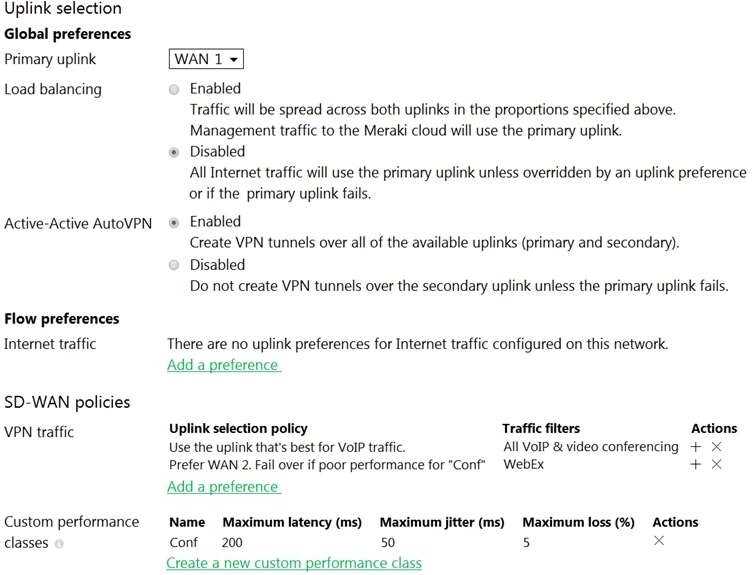
Assuming this MX has established a full tunnel with its VPN peer, how will the MX route the WebEx
traffic?
- A. WebEx traffic will prefer WAN 2 as long as it meets the thresholds in the “Conf” performance class.
- B. WebEx traffic will prefer WAN 1 as it is the primary uplink.
- C. WebEx traffic will prefer WAN 2 as long as it is up.
- D. WebEx traffic will be load-balanced between both active WAN links.
Answer:
A
Explanation:
Assuming this MX has established a full tunnel with its VPN peer, the MX will route the WebEx traffic
based on the SD-WAN policy configured in the exhibit. The SD-WAN policy has two performance
classes: Conf and Default.
The Conf performance class matches the traffic with destination port 9000,
which is used by WebEx for VoIP and video RTP3
. The Conf performance class has a preferred uplink
of WAN 2 and a failover uplink of WAN 1. It also has thresholds for latency, jitter, and loss that
determine when to switch from the preferred uplink to the failover uplink. Therefore, the WebEx
traffic will prefer WAN 2 as long as it meets the thresholds in the Conf performance class. If WAN 2
exceeds the thresholds or goes down, the WebEx traffic will switch to WAN 1 as the failover uplink.
Question 4
For which two reasons can an organization become “Out of License”? (Choose two.)
- A. licenses that are in the wrong network
- B. more hardware devices than device licenses
- C. expired device license
- D. licenses that do not match the serial numbers in the organization
- E. MR licenses that do not match the MR models in the organization
Answer:
BC
Explanation:
More hardware devices than device licenses: An organization needs to have enough device licenses
to cover all the hardware devices in its network. A device license is consumed by each device that is
added to the network.
If the number of devices exceeds the number of licenses, the organization will
be out of license and will lose access to some features and support until it purchases more licenses
or removes some devices4
.
Expired device license: A device license has an expiration date that depends on the license term
purchased by the organization. If a device license expires, it will no longer be valid and will not count
towards the license limit.
The organization will need to renew the expired license or purchase a new
one to avoid being out of license4
.
Reference:
https://documentation.meraki.com/General_Administration/Licensing/Meraki_Licensing_FAQs
Question 5
Refer to the exhibit.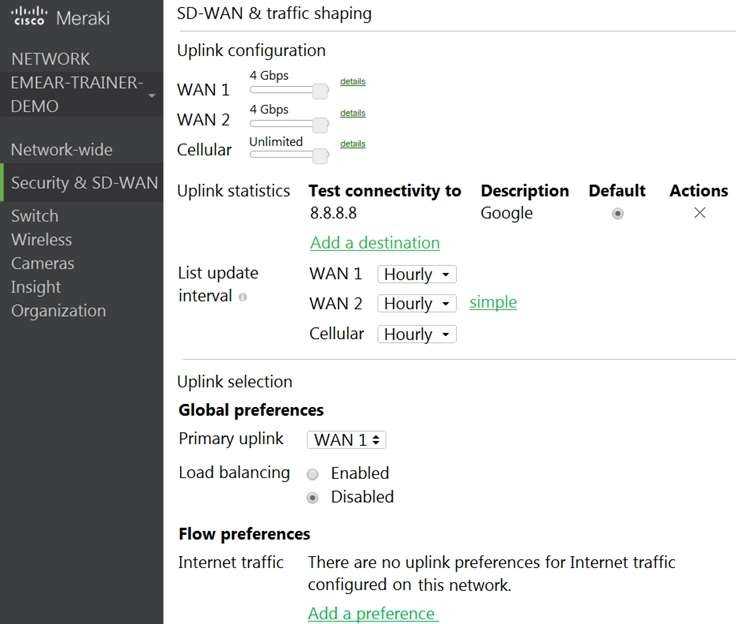
Which two actions are required to optimize load balancing asymmetrically with a 4:1 ratio between
links? (Choose two.)
- A. Change the primary uplink to "none".
- B. Add an internet traffic preference that defines the load-balancing ratio as 4:1.
- C. Enable load balancing.
- D. Set the speed of the cellular uplink to zero.
- E. Change the assigned speeds of WAN 1 and WAN 2 so that the ratio is 4:1.
Answer:
CE
Explanation:
To clarify, to optimize load balancing asymmetrically with a 4:1 ratio between links, two actions that
are required are:
Enable load balancing: This option allows the MX to use both of its uplinks for load balancing.
When
load balancing is enabled under Security & SD-WAN > Configure > SD-WAN & Traffic shaping, traffic
flows will be distributed between the two uplinks proportional to the WAN 1 and WAN 2 bandwidths
specified under Uplink configuration1
.
Change the assigned speeds of WAN 1 and WAN 2 so that the ratio is 4:1: The assigned speed of a
WAN link is a value that indicates the bandwidth available on that link.
By changing the assigned
speeds of WAN 1 and WAN 2 so that they reflect the desired load-balancing ratio, the administrator
can ensure that the MX uses both links efficiently and proportionally1
. For example, if WAN 1 has a
bandwidth of 100 Mbps and WAN 2 has a bandwidth of 25 Mbps, then setting their assigned speeds
to 100 Mbps and 25 Mbps respectively will achieve a 4:1 load-balancing ratio.
Question 6
Which Cisco Meraki best practice method preserves complete historical network event logs?
- A. Configuring the preserved event number to maximize logging.
- B. Configuring the preserved event period to unlimited.
- C. Configuring a syslog server for the network.
- D. Configuring Dashboard logging to preserve only certain event types.
Answer:
C
Explanation:
Configuring a syslog server for the network is the Cisco Meraki best practice method to preserve
complete historical network event logs.
A syslog server can be configured to store messages for
reporting purposes from MX Security Appliances, MR Access Points, and MS switches1
.
The syslog
server can collect various types of events, such as VPN connectivity, uplink connectivity, DHCP leases,
firewall rules, IDS alerts, and security events2
. The syslog server can also help with troubleshooting
and monitoring the network performance and security.
Question 7
Which design requirement is met by implementing syslog versus SNMP?
- A. when automation capabilities are needed
- B. when proactive alerts for critical events must be generated
- C. when organization-wide information must be collected
- D. when information such as flows and client connectivity must be gathered
Answer:
D
Explanation:
Implementing syslog versus SNMP can meet the design requirement of gathering information such
as flows and client connectivity. Syslog can collect and report various types of events, such as VPN
connectivity, uplink connectivity, DHCP leases, firewall rules, IDS alerts, and security events. Syslog
can also provide detailed information about the flows and client connectivity on the network
devices, such as source and destination IP addresses, ports, protocols, bytes transferred, etc. SNMP,
on the other hand, can collect and report various statistics and information about the network
devices, such as CPU utilization, interface status, memory usage, etc. However, SNMP does not
provide as much information about the flows and client connectivity as syslog does.
Reference:
https://documentation.meraki.com/General_Administration/Monitoring_and_Reporting/
Meraki_Device_Reporting_-_Syslog%2C_SNMP%2C_and_API
Question 8
Refer to the exhibit.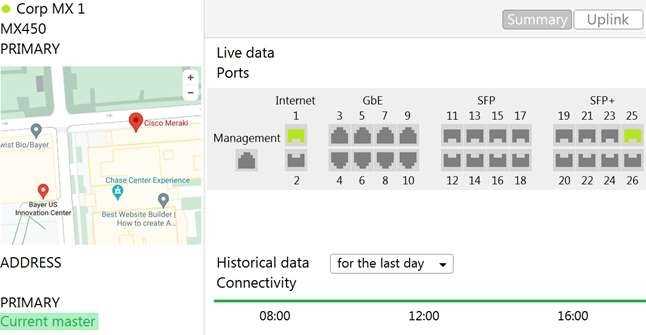
The VPN concentrator is experiencing issues. Which action should be taken to ensure a stable
environment?
- A. Add a deny any/any firewall rule to the end of the firewall rules.
- B. Remove the connection from Internet 1.
- C. Physically disconnect all LAN ports.
- D. Configure the MX appliance to Routed mode on the Addressing & VLANS page.
Answer:
C
Explanation:
Before deploying MXs as one-arm VPN concentrators, place them into Passthrough or VPN
Concentrator mode on the Addressing and VLANs page. In one-armed VPN concentrator mode, the
units in the pair are connected to the network "only" via their respective ‘Internet’ ports. Make sure
they are NOT connected directly via their LAN ports. Each MX must be within the same IP subnet and
able to communicate with each other, as well as with the Meraki dashboard. Only VPN traffic is
routed to the MX, and both ingress and egress packets are sent through the same interface.
https://documentation.meraki.com/Architectures_and_Best_Practices/Cisco_Meraki_Best_Practice_
Design/Best_Practice_Design_-_MX_Security_and_SD-
WAN/Meraki_Auto_VPN_General_Best_Practices
Question 9
Refer to the exhibit.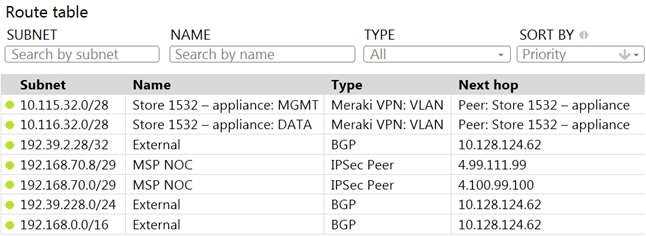
A packet arrives on the VPN concentrator with source IP 10.168.70.3 and destined for IP 10.116.32.4.
What is the next hop for the packet, based on this concentrator routing table?
- A. The concentrator gateway (10.128.124.62) is the next hop.
- B. Not enough detail is available to determine the next hop.
- C. The packet is stopped.
- D. The Auto VPN peer “Store 1532 – appliance” is the next hop.
Answer:
D
Explanation:
This can be determined by looking at the concentrator routing table and finding the entry for the
destination IP 10.116.32.4. The next hop for this entry is the Auto VPN peer “Store 1532 – appliance”.
This question is related to the topic of Implementing Dynamic Routing Protocols in the Engineering
Cisco Meraki Solutions (ECMS) official training documentation. You can find more information about
this topic in the
ECMS v2.2 Course Overview
or the
ECMS1 v2.1 Course Overview
.
Question 10
Company iPads are enrolled in Systems Manager without supervision, and profiles are pushed
through Systems Manager.
Which outcome occurs when a user attempts to remove the “Meraki Management” profile on an
iPad?
- A. The “Meraki Management” profile cannot be removed.
- B. The “Meraki Management” profile is removed and then pushed automatically by Systems Manager.
- C. The “Meraki Management” profile is removed. All the profiles that Systems Manager pushed are also removed.
- D. The “Meraki Management” profile is removed. All the profiles Systems Manager pushed remain.
Answer:
C
Explanation:
On the device, navigate to Settings > General > Device Management
Select Meraki Management, and select Remove to delete the management profile and any managed
configuration profiles installed via SM
Question 11
Which two features and functions are supported when using an MX appliance in Passthrough mode?
(Choose two.)
- A. intrusion prevention
- B. site-to-site VPN
- C. secondary uplinks
- D. DHCP
- E. high availability
Answer:
AB
Explanation:
These are the two features and functions that are supported when using an MX appliance in
Passthrough mode. According to the [MX Addressing and VLANs] article, Passthrough mode allows
the MX appliance to act as a layer 2 bridge, passing traffic between its LAN and WAN ports without
performing any routing or address translation. However, some features such as intrusion prevention
and site-to-site VPN are still available in this mode.
Reference: https://documentation.meraki.com/MX/Networks_and_Routing/
Passthrough_Mode_on_the_MX_Security_Appliance_and_Z-series_Teleworker_Gateway
Question 12
Refer to the exhibit.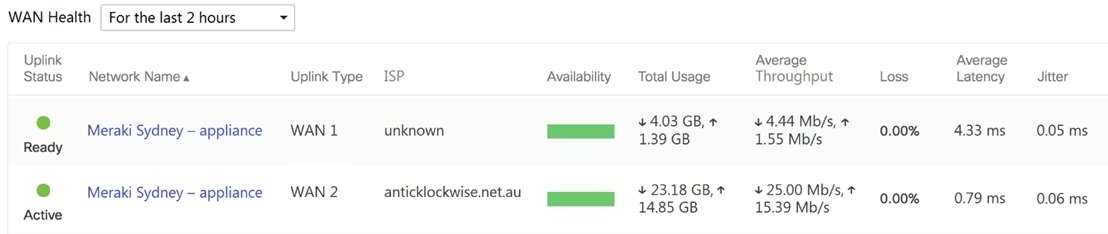
What are the Loss and Average Latency statistics based on?
- A. responses that the MX appliance receives on the connectivity-testing hostnames on the Insight > Web App Health page
- B. responses that the MX appliance receives on the connectivity-testing IP addresses on the Security & SD- WAN > Firewall page
- C. responses that the MX appliance receives on the connectivity-testing IP address that is configured on the Security & SD-WAN > SD-WAN & Traffic Shaping page
- D. responses that the MX appliance receives on the connectivity-testing IP addresses on the Help > Firewall info page
Answer:
C
Explanation:
Quote from referred documentation-Link: Loss and latency will be determined over the configured IP
address under Security and SD-WAN > SD-WAN and Traffic Shaping > Uplink Statistics. If no IP is
configured, these values will be measured against 8.8.8.8 by default. On the WAN Health page, all
the configured IP address statistics can be reviewed by changing the destination under the "Ping
Destination" column.
https://documentation.meraki.com/MI/MI_WAN_Health#:~:text=Current%20loss%20and%20latenc
y%20statistics,address%20is%20set%20to%208.8
.
Question 13
In an organization that uses the Co-Termination licensing model, which two operations enable
licenses to be applied? (Choose two.)
- A. Renew the Dashboard license.
- B. License a network.
- C. License more devices.
- D. Call Meraki support.
- E. Wait for the devices to auto-renew.
Answer:
A, C
Explanation:
There are two operations in which a license can be applied, License more devices or Renew my
dashboard license. This article will compare both operations and describe their behaviors.
https://documentation.meraki.com/General_Administration/Licensing/Meraki_Licensing_-
_License_More_Devices_vs_Renewal
These are the two operations that enable licenses to be applied in an organization that uses the Co-
Termination licensing model. According to the
Meraki Co-Termination Licensing Overview
, there are
two ways to add licenses to an organization:
Renewing the Dashboard license: This option allows you to extend the co-termination date of your
organization by purchasing new licenses for the same or longer term as your existing licenses. You
can renew your Dashboard license from the Organization > Configure > License Info page or from the
Meraki Dashboard homepage.
Licensing more devices: This option allows you to add new devices to your organization by
purchasing new licenses for them. You can license more devices from the Organization > Inventory
page or from the Meraki Dashboard homepage.
Question 14
Which two Systems Manager Live tools are available only for Apple Macs and Windows PCs and
cannot be used on iOS or Android mobile devices? (Choose two.)
- A. OS updates
- B. Send notification
- C. Selective wipe
- D. Screenshot
- E. Remote Desktop
Answer:
DE
Explanation:
https://documentation.meraki.com/SM/Monitoring_and_Reporting/MDM_Commands_in_Systems
_Manager
- Under Live Tools Selective Wiping is only for MacOS. Here we have Windows Laptop as
well
Reference: https://documentation.meraki.com/SM/Other_Topics/Systems_Manager_FAQ
Question 15
What are two ways peers interact with ports that Auto VPN uses? (Choose two.)
- A. For IPsec tunneling, peers use high UDP ports within the 32768 to 61000 range.
- B. Peers contact the VPN registry at UDP port 9350.
- C. For IPsec tunneling, peers use high TCP ports within the 32768 to 61000 range.
- D. Peers contact the VPN registry at TCP port 9350.
- E. For IPsec tunneling, peers use UDP ports 500 and 4500.
Answer:
AB
Explanation:
Ports used to contact the VPN registry:
- Source UDP port range 32768-61000
- Destination UDP port 9350 or UDP port 9351
Ports used for IPsec tunneling:
- Source UDP port range 32768-61000
- Destination UDP port range 32768-61000
https://documentation.meraki.com/MX/Site-to-site_VPN/Meraki_Auto_VPN_-
_Configuration_and_Troubleshooting
Reference: https://documentation.meraki.com/MX/Site-to-site_VPN/Meraki_Auto_VPN_-
_Configuration_and_Troubleshooting